If you are a content creator, you know the feeling all too well.
You are sitting at your desk, staring at a blank screen, keyboard ready, but the ideas just aren’t coming.
Catch the video of this here:
https://youtu.be/fMHxWMxU43g
I know I have had that happen WAY too many times through the years!
It is one of the toughest parts of the job—finding relevant, engaging topics that actually resonate with your audience.
Fortunately, there is a powerful tool in the world of Large Language Models (LLMs) that is offering some significant benefits over the competition.
It is called Grok, and it is designed to help you streamline your workflow, from idea generation to voice customization.
In this guide, we are going to dive into how you can use Groc to stay ahead of your market, set up automated tasks that deliver inspiration directly to your inbox, and utilize unique voice features to enhance your content creation process.
Never Start with a Blank Page Again
The biggest challenge for any creator is the “blank screen syndrome.” You know you need to produce content, but you don’t know what to talk about. Grok solves this by providing a way to get great ideas that are specifically relevant to your niche exactly when you need them.
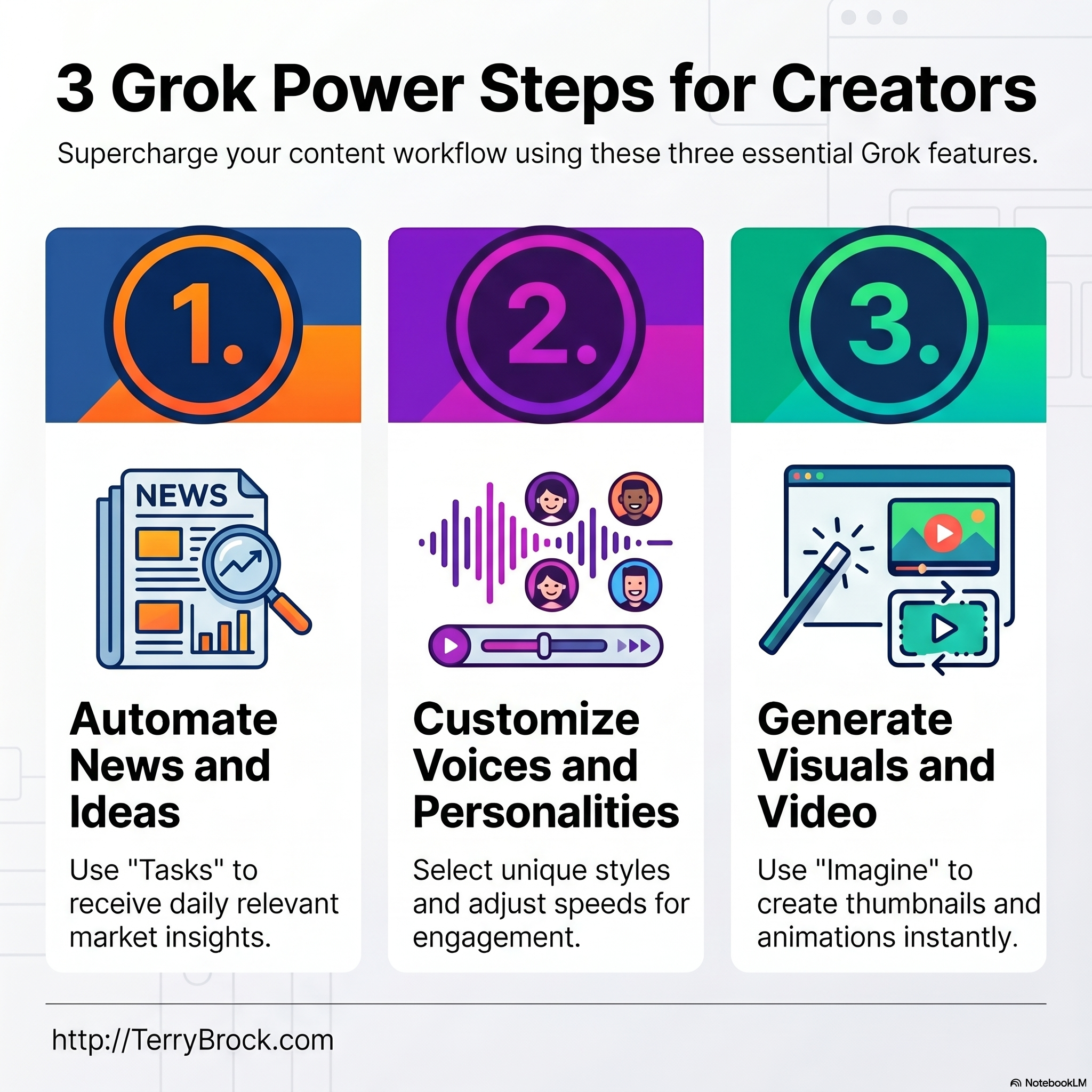
One of the standout features of Grok is the ability to set up specialized Tasks. These tasks act like a personal research assistant that scours the digital landscape for information you actually care about. Instead of wading through “network crap” or sensationalized breaking news, you get a clean, concise summary of what is happening in your specific industry.
Automating Your Research
Imagine waking up to an email that summarizes the latest trends in your field. For many creators, that might include updates on tools like Chat GPT, Perplexity, Claude, Gemini, or Cast Magic. Grok allows you to set up a task that monitors these specific interests and sends you a digest. When you click through from your email, Grok brings up in-depth stories for your audience.
By getting these summaries, you can quickly identify which stories are relevant to your audience that day and which ones you can skip.
This gives you the ideas to write you own material, speak your own voice and ideas, and build on top of a good foundation.
Pretty danged cool, I’d say!
It ensures you are always talking about what is “cooking” in your industry without spending hours searching for news manually.
Step-by-Step: Setting Up Your Grok Tasks
Setting up these automated research tasks is straightforward. If you want to customize your experience, follow these steps:
-
Access Your Profile: Navigate to the lower-left corner of the Grok interface and click on your personal profile icon.
-
Select Tasks: Choose the “Tasks” option from the menu, located right underneath settings.
-
Create and Schedule: Click to create a new task. You can set these to run daily, weekly, or even monthly. (For example, you could set a daily update for 4:07 a.m. so it’s ready the moment you start your workday).
-
Input Your Prompt: This is where you tell Grok exactly what you want. You can ask for inspiring quotes from entrepreneurs, ancient wisdom from stoic philosophers, or specific business trends.
By highlighting the topics that are important to you—whether it’s AI, business, or philosophy—you ensure that the ideas delivered to you are high-quality and ready to be turned into content.
Grok vs. The Competition: Why the Price Matters
While many LLMs offer similar research capabilities, Grok stands out when it comes to value. For creators looking to save on their monthly overhead, the price difference is notable. Tools like Perplexity often charge around $20 a month for similar features. Currently, Grok offers a robust suite of tools for approximately $8 a month. While $12 might not seem like a fortune, those savings add up for a creator managing multiple subscriptions, especially when you are getting equal or better functionality.
Customizing the AI Voice Experience
Beyond research and text generation, Grok offers a unique Voice feature that sets it apart from other LLMs. In the upper-left corner of the interface, you can switch between Chat, Voice, and Imagine (for image and thumbnail generation).
The Voice feature provides six different options, each with a distinct tone. It is highly recommended to experiment with each to see which fits your brand’s “vibe.”
Personalities and “Not Safe for Work” Modes
Grok allows you to take customization a step further by selecting a Personality for the AI. You can choose from modes like:
-
Assistant
-
Therapist
-
Storyteller (great for kids’ story time!)
-
Meditation Guide
-
Health Care Professional (Grok Doc)
However, you should be aware of the more “colorful” personalities.
There are options like Argumentative or Conspiracy which are rated 18+. These modes can use “military terms” and language that is definitely not safe for work. If you are in a professional environment or around children, it is best to stick to the Assistant personality to avoid any risky or “risque” language.
Advanced Speed Control for Learning
One of the most practical features within the Grok voice settings is the ability to adjust the playback speed. You can ramp the speed up to 2.0x for quick consumption or drop it well below 1.0x.
Why would you want the AI to talk slower? This is incredibly helpful for creators who are also language learners. If you are trying to learn Spanish, Russian (like I am), or any other language, hearing a new phrase said very slowly and carefully can drastically improve your retention and pronunciation. It turns your AI content tool into a powerful educational resource.
Key Takeaways for Content Creators
-
Automate Inspiration: Use the Tasks feature to get a daily digest of relevant news, removing the struggle of finding new topics.
-
Cost Efficiency: At $8/month, Grok offers a budget-friendly alternative to more expensive AI research tools.
-
Diverse Personalities: Choose from a variety of AI personas, but use caution with the 18+ modes in professional settings.
-
Speed Control: Adjust voice speed for better productivity or as a tool for learning new languages.
-
Visual Content: Don’t forget to explore the “Imagine” tab for help with thumbnail creation and visual ideas.
Conclusion
Grok is proving to be a versatile and cost-effective ally for content creators.
Whether you are using it to break through writer’s block with automated tasks, experimenting with different AI voices for your projects, or using the speed controls to learn a new language, the tool offers a level of customization that is hard to find elsewhere.
By integrating these features into your daily routine, you can spend less time staring at a blank screen and more time creating content that your audience loves. Get in there, play around with the voices, and see how Grok can help you level up your creator game.
Watch the full video: https://www.youtube.com/watch?v=fMHxWMxU43g
I look forward to hearing from you.
Terry
Watch the full video: https://www.youtube.com/watch?v=fMHxWMxU43g
For your convenience, here’s the transcript of this episode:
Terry Brock [00:00:00]:
Okay, you content creator. I’ve got something that’s gonna help you a lot when you’re working with different tools. Let’s take a look at Grok, g r o k. It’s an LLM, large language model, that is out there offering some significant benefits over some of the others. I’m gonna show you exactly why and where, and as a content creator, how you’re gonna like it. Matter of fact, we’re gonna show that. We’re also gonna talk about the voices that are there that can help in many different ways and how you can use this for creating thumbnails. Exactly.
Terry Brock [00:00:26]:
Well, let’s get right into it right now. When you wanna get ideas, you know, that’s one of the toughest things. You’re sitting there. You got can you relate to this? A blank screen is there. You got your keyboard. You’re going, what am I gonna talk about this time? I don’t know. Okay. Well, I’m gonna show you a way you can get great ideas that are relevant to your market and be able to get that specifically when you need them, when you’re sitting down saying, okay.
Terry Brock [00:00:49]:
How do we do this? Well, here’s what happens. Let’s take a look at this. So here I am on my email, got an email message that came in to me from Grok. I set up a special task, that’s what they call it, a task that gives me relevant information based on what I wanna know for my market. For me, it’s AI, AI tools, specifically what’s happening with tools like ChatGPT, Grok, Perplexity, Claude, Gemini, NotebookLM, Cast Magic, Taja, and others. I’ve got those that are interested of interest to me and my audience. You’ve got some that might be of interest to you and you wanna have it, whatever it might be, whatever the topic is. So you can look at it.
Terry Brock [00:01:29]:
By the way, some of the other areas I’ll look into would be business trends in general because I’m dealing with that. Also, I want to find out what’s happening in the world of just general news. So I know I get the summary of it real quick minus and devoid of all the network crap that comes along, you know, with a, this breaking news just in. Terrible thing just happened over here. Well, I don’t care about that. I wanna get the answers. So here’s what we’re gonna do. You notice this, it gives me some information, says here it is, and, hey, to continue reading, I click here.
Terry Brock [00:01:59]:
So watch what happens when I do that. I’m clicking here on this to go through, and it brings up Grok. I go into Grok, and you can see right now, here I am. It gives me these stories in-depth. So I can see what’s going on and with them, and I can see the big stories. Like, for instance here, today, I’m getting real specific here, Runway’s gen four director mode is there. Eleven Labs launched voice clone marketplace. Hey, that’s kinda interesting.
Terry Brock [00:02:25]:
Hugging Face, and it’s got a replicate. They unveiled a new core source creator stack. Okay. All of this is interesting. Not all of it is gonna be relevant to me every day, and that’s okay. Here’s the idea. I don’t have to select everything every day. I get just what I need on that day for what my audience is looking for, you.
Terry Brock [00:02:44]:
And I wanna find out from you. Of course, I wanna hear from you directly. Leave a note, and, hey, you can do that right here. Leave a nice like on it and register for this sign up, and then you’re getting the notices more, and you can let me know what you want. But I wanna help you on that. And you see, it gives me the information right here that I need. Chat GPT, I’m getting something there that’s open. They’ve got some nice nice ideas going there with Grok, Perplexity, Gemini, Cast Magic, and I I like this here.
Terry Brock [00:03:11]:
It says Cast Magic is down there, but no new announcements this week. Okay. That’s good. I can see that. Taja, hey. They’re cooking. They’re doing some really good things over there. Been talking with what they’re doing on on the kind of things they’re doing in a great way.
Terry Brock [00:03:24]:
But I want you to see what you can do on this. Well, you might be thinking, okay, Terry. That’s real nice, but how do I set that dadgum thing up? What do I do? Well, let me show you. So here I am on Grok, and I wanna do that and get this set up. You’ll notice in the lower left corner, way down there, you see picture of a guy with a really good haircut. That’s me. And you’ll see it’s there I’ve got this. So what I’m gonna do, that’s that’s your you should have that on your computer also.
Terry Brock [00:03:48]:
That’s a personal profile, so what I’m gonna do is I’m gonna click on that, and when I click on that, you’ll see it gives me a choice of a few different things. So I can look here at the settings, I can see tasks, and that’s what we want. We want the tasks feature. So what I’m going to do is I’m going to come over here and click on that, make sure that it’s still relevant there, And when I do it, I’m gonna select the tasks, which is the second one down right underneath settings. And when I click on task, you’ll see it takes me over here to, well, what do you think? Task itself. But it shows me what we can do. If you wanna create a task, you can just click up here in creating it. But before we create one, let’s see what it can do.
Terry Brock [00:04:26]:
You see, I can have it set up right here to come in at a given time. This one particular, I’ve got it coming in daily for me at 04:07AM. And by the way, for me, that’s a special number because, hey, I live in Orlando. So we’ve got it there. But I put that in there. I can have it come in every so often. I can have the tools coming in there three hours ago. I can have it in different times on the the time that I want it, and I can do this in a really nice way.
Terry Brock [00:04:54]:
Look at this what you can do. You can click on this and make sure that it’s coming in at a given time, and it shows you what’s happening here. Some of the areas and it shows me the prompt that I use on this. Notice how I did this and how you can do something that’s very similar. This is gonna give you the ability to get, this customized the way you want. I put in here, give me five inspiring quotes from entrepreneurs and success business leaders, and I want to draw from ancient wisdom, from philosophers like stoics, writers, etcetera, etcetera. Give me the ideas, and I can use them on topics like and then I go on and talk about the various topics. So what you can do is you can take this, and you can then highlight the topics that are important to you.
Terry Brock [00:05:37]:
For me, it’s AI, business. I wanna know about the stoic philosophers, those kind of things. You set up what’s right for you, and you can have these coming in on a regular daily basis. You can have it come in once a week if you want. You can have it come in monthly if you want. Some might be that way, so you don’t need to know it every day, just monthly. But you can set these up, and you see the real benefit of this? Once you get this set, now you’re gonna be able to have the ideas that your audience is looking for. That’s the key.
Terry Brock [00:06:09]:
Creator to creator, we know that’s one of the biggest challenges when we’re facing this. We stare at that screen. I don’t know, maybe you can relate to this, but stared at the screen and couldn’t come up with an idea at all. Well, I find that if I get the ideas from what’s going on in the news relevant to my market, hey, that makes a lot more sense, and it works for me. So here is a great tool you can use within Grok. This is also available in some other tools. I find Grok gives it to me. And by the way, with perplexity, I get it.
Terry Brock [00:06:40]:
They charge $20 a month for that. And, okay, that’s what they charge. I’m buying that, paying for it right now, but maybe moving on. Grok, I get it for $8 a month. I know, not a big deal there, but it is some significant savings, and I’m getting this and even more with grok. It’s a great little tool to look into. One of the real advantages of using grok is that you get different voices, different styles of voice as well, which is really unique. I haven’t seen that in some of the other LLMs, and I find it really interesting.
Terry Brock [00:07:11]:
Let’s take a look at it here. You’ll see over here in the upper left corner, you have chat, you have voice, and imagine. Well, voice is what we want. And when you click on voice, it’s gonna give you some really good opportunities. So here I am on the screen, and you can see over here in the upper left corner. It’s got the options, like I mentioned, voice is there. I’ve now typed on voice, so I’ve selected that, and you’ll see down here at the bottom of the screen, it shows that I’m using the voice called Ara, a r a, which is the assistant. And when I click on that, watch what happens.
Terry Brock [00:07:43]:
It brings up some information that I can see. We’ve got six different voices you can use, and it kinda explains what they are. So I can see Ara, well, that’s an upbeat female. I’ve got Eve, soothing female, Leo, Rex, Sal, and Gork. I would recommend for you to try each one. Say, okay. Which one is right for me? I like this one, or I don’t care for that one. Find one that works for you.
Terry Brock [00:08:07]:
I have found that era tends to be a little bit better for me, just really straightforward, gets the job done, and talks about it, but it works. You find what works best for you. In this next area is where it gets really interesting with personality. You can put this in here, and I’m gonna select one that can help you on this because that’s gonna be really, really important that you see exactly what’s going on and how this can work. You’ll see that it gives you the ability for several different personalities, a lot of them. Assistant, you get therapist, storyteller, kids’ story time. Hey, you got some kids that wanna have stories told to? This is a great way to do it. And kids’ trivia game, meditation, a grok doc.
Terry Brock [00:08:47]:
In other words, in medical. Now it’s not a real doctor, and they say you definitely need to go to a real medical health care professional to get help on this stuff. Get a health care professional and do it. But this gives you some ideas and help. I like the assistant because it works pretty well. One of the things that you wanna watch out for and be careful of is sexy and then motivation, conspiracy, romantic, argumentative. The argumentative one particularly is 18 plus. It’s gonna use, shall we say, some more colorful military terms that are out there that you might have heard somewhere.
Terry Brock [00:09:21]:
Well, if you’re in an environment where that’s okay, then fine. If you’re not offended by that, fine. Those that might be, be aware. You might wanna stay away from that right there. And so the 18 plus, okay, it can get a little bit, shall we say, risque. Wanna be careful, not safe for work language that can be there. That’s why I tend to lean back toward assistant and you can use that very well. By the way, another nice thing on here as you can see is you can adjust the speed.
Terry Brock [00:09:46]:
Boy, this is nice. I noticed I can take the speed here and I can move it up, right, from here up to two point zero, so twice as fast, or I can move it down here low. And notice this, I can even move it below 1.5, 0.6, etcetera. All of those are available. I’m bringing it back up here to one. And you might think, well, Terry, why would we do that? Why would I ever wanna take it below one? Well, it can be real helpful in learning a language. I’m working on Spanish right now and also a little bit of Russian. Just I did Russian in undergrad school and now working on Spanish.
Terry Brock [00:10:20]:
It’s really potential, a lot of language here. We have a lot of people here in Central Florida that speak Spanish, and I love having them here. They’re great. I’m working to learn that, but when I’m learning a new phrase or something, sometimes I need it to be said very slowly and carefully in that language. Well, I just roll it down to where it’s real, real slow, and that helps me to learn. Another real advantage of using this. So you’ve got a lot of capabilities with this. I recommend get into that, play around with it, experiment with the different voices, experiment with the different personalities.
Terry Brock [00:10:57]:
Just be careful when you’re doing it and who’s around on some of those that you might select, but you’ll have some fun with it, and they can help you. And then there’s a third element that you want to know about Grok. There’s a lot more than that, but in this video we’re gonna do these three. The third one where you can create thumbnails and other graphics using grok. I’m over here in grok right now and you can see there’s a lot of capabilities here. I want you to notice up here, we have search, chat, voice here, and I’m clicking on in the low bottom there on the left side, imagine up there toward the top. When I click on that, look at what happens here. Pretty amazing.
Terry Brock [00:11:33]:
All of the capabilities that it has and what’s available, and it gives you the ability to have all of these as, yes, animation. So you can have that and video. The video comes through real, real well on this, or you can create pictures by themselves, and it gives you the ability to work with that. Look at the capabilities here and the quality. This is something that I think is nothing short of amazing what it does and what it can do for you. Really top flight and good information. Well, let’s take a look at some of the things that it has already done. Take a look at this.
Terry Brock [00:12:10]:
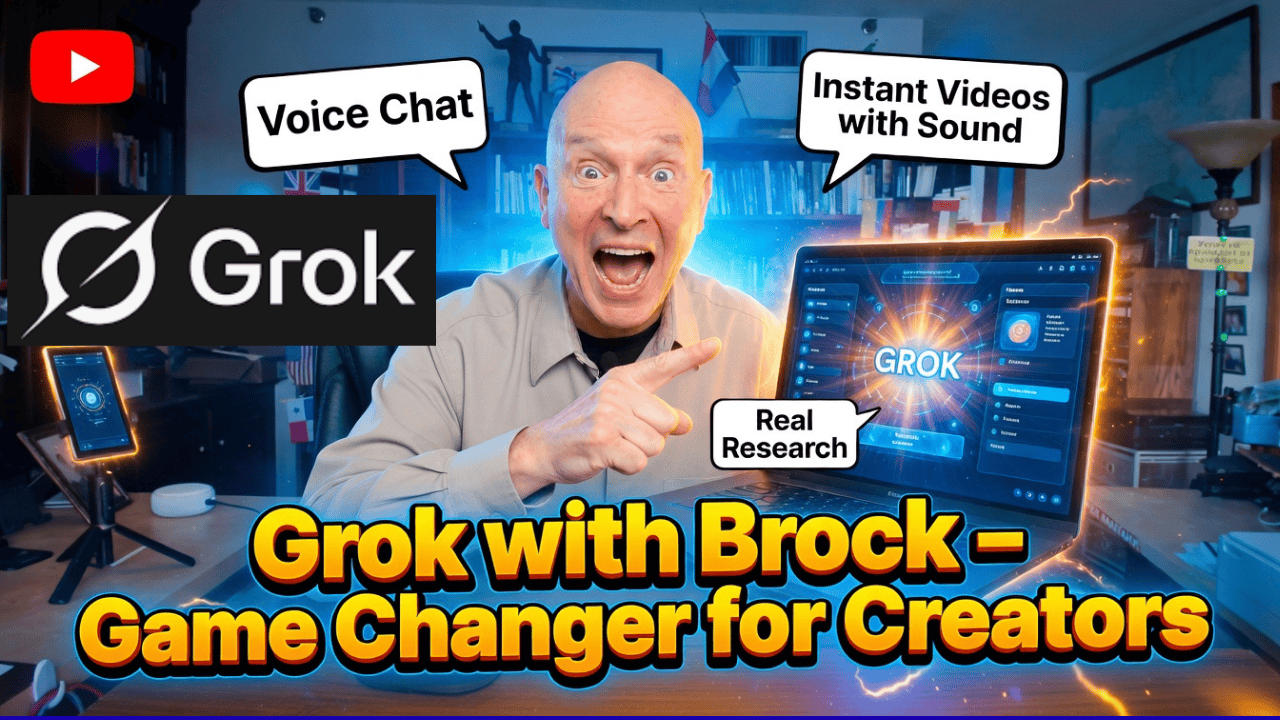
I told it to put together a video or picture, I should say. I wanted a thumbnail that I could use in YouTube, follow the YouTube dimensions and do all that, and I gave it a picture of me. Yeah. Me right there. Still that I had, You don’t make it a nice face like we do for the thumbnails. And then it put all this together and even came up with something I like, Grok with Brock. I’m Terry Brock. And not everybody can use that one.
Terry Brock [00:12:36]:
Yeah. But a few can. Yeah. But Grock with Brock, game changer for creators, and it puts in some of the features that are there, instant videos and sound, your real research you’re gonna put in there, voice chat that you can use, all of those features. I’m thinking this is pretty good. I’d love to hear from you in the comments. Let me know. Was that okay or not good? It seems like it could be real good, and the nice thing about it is not only does it do that, but it also can create a video because you’re seeing the completed picture here.
Terry Brock [00:13:06]:
When you’re in the phone the preparation mode, it gives you the ability to create a video. Let me show you what happens when we do that. So here I am on the screen here with the video. It starts and I say video. They took the still and then turned it into a video. Watch this. Achopp with Brock is a GazeChat, instant videos with sound and real research. This will transform your content creation.
Terry Brock [00:13:31]:
Well, that is interesting when we see that. It is interesting. It’s, pretty fast, only about five to eight seconds, I think, and it gave us a view of me. I’ll put that in air quotes. Me didn’t sound like me, didn’t act like me, really. So I’d say we’re at the beginning. As we often say here in AI, this is the worst it will ever be because it’s always getting better. But I think they’ve done a good job on using that.
Terry Brock [00:13:56]:
Now think about it. Could I use that maybe in some other cases? Yeah. I could. Not so much for me because it doesn’t look exactly like me. But what if this were going that video was going out to people that don’t know me and was for a completely different purpose? Hey. Maybe we could use it there, and this gives us some real good possibilities. Right now, it can do it. I encourage you to get that.
Terry Brock [00:14:18]:
I’m using the $8 a month plan with Grok. $8. Try it, please. Experiment with it. See what’s available, and think about how you could use it. Now they have a higher version. They’re for $30 a month. Gives you a little bit more potential, a lot more capabilities.
Terry Brock [00:14:33]:
Frankly, they do a very good job at $8 a month. You’re getting a lot of value. I know I am right now, and so this is something you want to look into. Think about it, and there’s some profound ways that you can start using this. We have some great capabilities with this tool. It can help you in many ways, and this is something that can be a good tool chest for you as a creative conductor. That’s what we are. Like a conductor in an orchestra, you want to be creative knowing you can use these different tools, knowing that you can use Grok as another tool.
Terry Brock [00:15:06]:
You might use still GPT. I do. I pay for it. I use it. I like it. I have some other programs that I use, and I love those. I’m using Cast Magic. I use Taja.
Terry Brock [00:15:17]:
These are great tools, and they give me the ability to get a lot done. Sometimes there’s some overlap with various AI tools. That’s okay. As long as I know I’m getting a business value from it. And also, I’m not locked into any program forever. Things change. Company that is good right now might not be. Company that was is bad right now might get a little bit better.
Terry Brock [00:15:40]:
Hey, that’s okay. We’ve got to keep adjusting and adapting as we go. As the United States Marines say, improvise, adapt, and overcome. That’s what you wanna do. And a great way to do that is right here with us at Stark Raving Entrepreneurs. Don’t leave right now. Really want you to like this and share it, and then leave a notice down there below, a comment to let us know what you think and what you like it. Gina Carr and I have this program to help you build your business to learn about technology, learn about AI, and get a lot done.
Terry Brock [00:16:10]:
And this is what you want to do. We’ve got a gift for you right here, AI tools for biz. That’s a I tools, the number four, biz.com. No spaces in there. And for those of you that are catching this on audio, you’ll want to take a look at this and you can see it. For those of you on video, hey, here’s a QR code you can use that will give you the ability to start working with this right away. So there’s a lot of good available for you on this. Look into grok.
Terry Brock [00:16:37]:
I like it for another reason. A lot of people say for whatever reason, they don’t want to use GROC. Well, that’s okay. That’s their choice. I like it when I can get the information that is out there that they are not going to get because for whatever reason, they don’t want it. I am agnostic on the LLMs. I will use it. I happen to like GROC.
Terry Brock [00:16:57]:
I happen to like it a lot, and it’s got a lot of good opportunities for you. So check into that, see what’s available, and let us know. I’m looking forward to hearing from you. And matter of fact, as you’re doing that, I’ve got another video for you right over here that’s gonna help you to get some more information on how to build your business. You definitely wanna check it out. I’m Terry Brock. Thanks for joining me today.
And for your convenience, here’s a Spanish language version of the transcript:
Terry Brock [00:00:00]:
Muy bien, creador de contenido. Tengo algo que te va a ayudar muchísimo cuando trabajas con diferentes herramientas. Vamos a echarle un vistazo a Grok, g r o k. Es un LLM, un modelo de lenguaje grande, que está ahí afuera ofreciendo beneficios importantes sobre algunos de los demás. Voy a mostrarte exactamente por qué, en qué casos, y cómo, como creador de contenido, te va a gustar. De hecho, vamos a mostrar eso. También vamos a hablar de las voces que están disponibles y que pueden ayudar de muchas maneras diferentes, y cómo puedes usar esto para crear miniaturas. Exactamente.
Terry Brock [00:00:26]:
Bueno, vamos a entrar en materia ahora mismo. Cuando quieres obtener ideas, ya sabes, esa es una de las cosas más difíciles. Estás ahí sentado. ¿Te puedes identificar con esto? Tienes una pantalla en blanco. Tienes tu teclado. Y estás pensando: ¿de qué voy a hablar esta vez? No lo sé. Bien. Pues voy a mostrarte una manera de obtener grandes ideas que sean relevantes para tu mercado, y poder conseguirlas específicamente cuando las necesites, cuando estés sentado diciendo, okay.
Terry Brock [00:00:49]:
¿Cómo hacemos esto? Bueno, mira lo que pasa. Vamos a ver esto. Aquí estoy en mi correo electrónico, tengo un mensaje que me llegó de Grok. Configuré una tarea especial, así es como ellos la llaman, una tarea que me da información relevante basada en lo que quiero saber para mi mercado. Para mí, es IA, herramientas de IA, específicamente lo que está ocurriendo con herramientas como ChatGPT, Grok, Perplexity, Claude, Gemini, NotebookLM, Cast Magic, Taja y otras. Tengo ahí las que son de interés para mí y para mi audiencia. Tú tendrás algunas que podrían ser de interés para ti, y querrás tenerlo, sea lo que sea, cualquiera que sea el tema. Así que puedes verlo.
Terry Brock [00:01:29]:
Por cierto, algunas de las otras áreas que yo revisaría serían tendencias de negocios en general, porque estoy trabajando con eso. También quiero enterarme de qué está pasando en el mundo de las noticias generales. Así obtengo el resumen de forma rápida, sin toda la basura de las cadenas de noticias que viene acompañando, ya sabes, con un “última hora, acaba de pasar esto”. Ocurrió algo terrible por allá. Bueno, eso no me importa. Yo quiero obtener las respuestas. Así que esto es lo que vamos a hacer. Fíjate en esto, me da cierta información, dice aquí está, y, oye, para seguir leyendo, hago clic aquí.
Terry Brock [00:01:59]:
Así que mira lo que pasa cuando hago eso. Estoy haciendo clic aquí para avanzar, y me abre Grok. Entro en Grok, y puedes ver que ahora mismo, aquí estoy. Me da estas historias en profundidad. Así puedo ver qué está pasando con ellas, y puedo ver las grandes historias. Como por ejemplo, hoy, siendo muy específico aquí, Runway tiene su modo director de Gen-4. Eleven Labs lanzó un mercado de clonación de voz. Oye, eso está medio interesante.
Terry Brock [00:02:25]:
Hugging Face, y tiene una integración con Replicate. Presentaron una nueva pila central de creadores de código abierto. Okay. Todo esto es interesante. No todo va a ser relevante para mí todos los días, y eso está bien. La idea es esta: no tengo que seleccionar todo todos los días. Solo obtengo lo que necesito ese día para lo que mi audiencia está buscando, tú.
Terry Brock [00:02:44]:
Y quiero saber de ti. Claro, quiero escucharte directamente. Deja una nota, y, oye, puedes hacerlo aquí mismo. Deja un buen “me gusta” y regístrate, y así recibirás los avisos más seguido, y podrás decirme lo que quieres. Pero quiero ayudarte con eso. Y ves, me da la información justo aquí, la que necesito. ChatGPT, estoy obteniendo algo ahí que está abierto. Tienen algunas ideas muy buenas por ahí, junto con Grok, Perplexity, Gemini, Cast Magic, y esto me gusta.
Terry Brock [00:03:11]:
Dice que Cast Magic está ahí abajo, pero que no hubo anuncios nuevos esta semana. Okay. Eso está bien. Puedo verlo. Taja, oye, están cocinando. Están haciendo cosas realmente buenas allá. He estado hablando de lo que están haciendo, del tipo de cosas que están haciendo de una gran manera. Pero quiero que veas lo que puedes hacer con esto. Bueno, tal vez estás pensando: okay, Terry. Eso está muy bonito, pero ¿cómo configuro esa condenada cosa? ¿Qué hago? Bueno, déjame mostrarte.
Terry Brock [00:03:24]:
Aquí estoy en Grok, y quiero hacer eso y dejarlo configurado. Notarás que en la esquina inferior izquierda, bien abajo, ves la foto de un tipo con un muy buen corte de pelo. Ese soy yo. Y verás que ahí está. Tengo esto. Así que lo que voy a hacer, eso es… eso es… tú también deberías tener eso en tu computadora. Ese es un perfil personal, así que lo que voy a hacer es hacer clic ahí, y cuando hago clic ahí, verás que me da la opción de varias cosas diferentes.
Terry Brock [00:03:48]:
Entonces puedo ver aquí la configuración, puedo ver tareas, y eso es lo que queremos. Queremos la función de tareas. Así que lo que voy a hacer es venir aquí y hacer clic en eso, asegurarme de que sigue siendo relevante ahí. Y cuando lo hago, voy a seleccionar tareas, que es la segunda opción hacia abajo, justo debajo de configuración. Y cuando hago clic en tarea, verás que me lleva a, bueno, ¿qué crees? A tarea misma. Pero me muestra lo que podemos hacer. Si quieres crear una tarea, puedes simplemente hacer clic aquí arriba para crearla. Pero antes de crear una, veamos lo que puede hacer.
Terry Brock [00:04:26]:
Ves, puedo configurarla aquí mismo para que llegue a una hora determinada. Esta en particular, la tengo llegando diariamente a las 04:07 AM. Y, por cierto, para mí ese es un número especial porque, oye, vivo en Orlando. Así que la tengo así. Pero puse eso ahí. Puedo hacer que llegue cada cierto tiempo. Puedo tener las herramientas llegando ahí hace tres horas. Puedo configurarlo en distintos horarios, en el momento que yo quiera, y puedo hacerlo de una manera realmente buena.
Terry Brock [00:04:54]:
Mira esto que puedes hacer. Puedes hacer clic en esto y asegurarte de que llegue a una hora determinada, y te muestra lo que está pasando aquí. Algunas de las áreas, y me muestra el prompt que usé para esto. Fíjate cómo hice esto y cómo tú puedes hacer algo muy parecido. Esto te va a dar la capacidad de obtener esto personalizado exactamente como tú quieras. Yo puse aquí: dame cinco citas inspiradoras de emprendedores y líderes empresariales exitosos, y quiero que se basen en sabiduría antigua, de filósofos como los estoicos, escritores, etcétera, etcétera. Dame ideas, y puedo usarlas en temas como… y luego sigo hablando de los diferentes temas.
Terry Brock [00:05:37]:
Así que lo que puedes hacer es tomar esto, y luego destacar los temas que son importantes para ti. Para mí es IA, negocios. Quiero saber sobre los filósofos estoicos, ese tipo de cosas. Tú configuras lo que sea correcto para ti, y puedes hacer que eso te llegue de manera regular, todos los días. Puedes hacer que llegue una vez a la semana si quieres. Puedes hacer que llegue una vez al mes si quieres. Algunas cosas podrían ser así, no necesitas saberlas todos los días, solo mensualmente. Pero puedes configurar esto. ¿Y ves el verdadero beneficio de esto? Una vez que dejas esto configurado, ahora vas a poder tener las ideas que tu audiencia está buscando. Esa es la clave.
Terry Brock [00:06:09]:
De creador a creador, sabemos que ese es uno de los mayores retos cuando estamos frente a esto. Nos quedamos mirando esa pantalla. No sé, quizá tú te puedes identificar con esto, pero te quedas mirando la pantalla y no se te ocurre ni una sola idea. Bueno, yo encuentro que si obtengo ideas de lo que está pasando en las noticias y que es relevante para mi mercado, oye, eso tiene mucho más sentido, y me funciona. Así que aquí tienes una gran herramienta que puedes usar dentro de Grok. Esto también está disponible en algunas otras herramientas. Yo veo que Grok me lo ofrece.
Terry Brock [00:06:40]:
Y por cierto, con Perplexity yo también lo tengo. Ellos cobran 20 dólares al mes por eso. Y, okay, eso es lo que cobran. Lo estoy comprando, lo estoy pagando ahora mismo, pero quizá cambie más adelante. Grok, yo lo obtengo por 8 dólares al mes. Ya sé, no es una gran diferencia, pero sí representa un ahorro importante, y estoy obteniendo esto e incluso más con Grok. Es una gran herramienta pequeña para investigar. Una de las verdaderas ventajas de usar Grok es que obtienes diferentes voces, diferentes estilos de voz también, lo cual es realmente único. No he visto eso en algunos de los otros LLM, y me parece realmente interesante.
Terry Brock [00:07:11]:
Vamos a verlo aquí. Verás aquí en la esquina superior izquierda, tienes chat, tienes voz y tienes imagine. Bueno, voz es lo que queremos. Y cuando haces clic en voz, te va a dar muy buenas oportunidades. Así que aquí estoy en la pantalla, y puedes ver aquí en la esquina superior izquierda. Tiene las opciones, como mencioné, voz está ahí. Ahora ya hice clic en voz, así que la he seleccionado, y verás aquí abajo, en la parte inferior de la pantalla, que muestra que estoy usando la voz llamada Ara, a r a, que es la asistente. Y cuando hago clic ahí, mira lo que pasa.
Terry Brock [00:07:43]:
Aparece información que puedo ver. Tenemos seis voces diferentes que puedes usar, y más o menos explica lo que son. Así puedo ver Ara, bueno, esa es una voz femenina alegre. Tengo Eve, femenina y calmante, Leo, Rex, Sal y Gork. Yo te recomendaría que pruebes cada una. Di: okay. ¿Cuál es la adecuada para mí? Me gusta esta, o no me gusta esa. Encuentra una que funcione para ti.
Terry Brock [00:08:07]:
He visto que Ara tiende a funcionar un poco mejor para mí, simplemente es muy directa, hace el trabajo y habla de ello, pero funciona. Tú encuentra lo que funcione mejor para ti. En la siguiente área es donde esto se pone realmente interesante con la personalidad. Puedes poner esto aquí, y voy a seleccionar una que puede ayudarte con esto porque va a ser realmente, realmente importante que veas exactamente qué está pasando y cómo esto puede funcionar. Verás que te da la capacidad de escoger entre varias personalidades, un montón de ellas.
Terry Brock [00:08:47]:
Asistente, tienes terapeuta, narrador, hora de cuentos para niños. Oye, ¿tienes niños a los que les gustaría que les contaran historias? Esta es una gran manera de hacerlo. Y juego de trivia para niños, meditación, un Grok Doc. En otras palabras, algo médico. Ahora, no es un doctor de verdad, y ellos dicen que definitivamente necesitas acudir a un verdadero profesional de la salud para recibir ayuda con estas cosas. Busca un profesional de la salud y hazlo. Pero esto sí te da algunas ideas y cierta ayuda. A mí me gusta el asistente porque funciona bastante bien.
Terry Brock [00:09:21]:
Una de las cosas que debes vigilar y tener cuidado es con sexy y luego motivación, conspiración, romántico, argumentativo. La opción argumentativa en particular es para mayores de 18 años. Va a usar, digamos, algunos términos militares más coloridos que probablemente ya hayas escuchado por ahí. Bueno, si estás en un ambiente donde eso está bien, entonces perfecto. Si eso no te ofende, perfecto también. Pero quienes sí podrían sentirse ofendidos, deben tener cuidado. Quizá quieras mantenerte alejado de eso. Así que la categoría 18 plus, okay, puede ponerse un poquito, digamos, arriesgada. Debes tener cuidado, porque puede haber lenguaje no apto para el trabajo. Por eso yo tiendo a volver hacia asistente, y puedes usarlo muy bien.
Terry Brock [00:09:46]:
Por cierto, otra cosa buena aquí, como puedes ver, es que puedes ajustar la velocidad. Caramba, esto está buenísimo. Me di cuenta de que puedo tomar la velocidad aquí y subirla, ¿verdad?, desde aquí hasta 2.0, o sea, el doble de rápido, o puedo bajarla aquí. Y fíjate en esto, incluso puedo bajarla por debajo de 1.5, 0.6, etcétera. Todo eso está disponible. Yo la voy a regresar a 1. Y quizá estés pensando, bueno, Terry, ¿por qué haríamos eso? ¿Por qué querría bajarla por debajo de 1? Bueno, puede ser muy útil al aprender un idioma.
Terry Brock [00:10:20]:
Ahora mismo estoy trabajando en español y también un poco en ruso. Estudié ruso en la universidad y ahora estoy trabajando en español. Realmente hay mucho potencial aquí con los idiomas. Tenemos mucha gente aquí en el centro de Florida que habla español, y me encanta tenerlos aquí. Son estupendos. Estoy trabajando para aprenderlo, pero cuando estoy aprendiendo una frase nueva o algo así, a veces necesito que se diga muy lentamente y con mucho cuidado en ese idioma. Bueno, simplemente bajo la velocidad hasta que quede bien, bien lenta, y eso me ayuda a aprender. Otra gran ventaja de usar esto.
Terry Brock [00:10:57]:
Así que tienes muchas capacidades con esto. Te recomiendo: entra, juega un poco con ello, experimenta con las diferentes voces, experimenta con las distintas personalidades. Solo ten cuidado con lo que haces y con quién esté cerca cuando selecciones algunas de ellas, pero te vas a divertir un poco con eso, y pueden ayudarte. Y luego hay un tercer elemento que quieres conocer sobre Grok. Hay mucho más que eso, pero en este video vamos a hacer estos tres. El tercer punto es donde puedes crear miniaturas y otros gráficos usando Grok.
Terry Brock [00:11:33]:
Estoy aquí en Grok ahora mismo y puedes ver que hay muchas capacidades aquí. Quiero que te fijes aquí arriba. Tenemos buscar, chat, voz aquí, y yo estoy haciendo clic abajo, hacia la izquierda, en imagine, allá arriba, hacia la parte superior. Cuando hago clic ahí, mira lo que pasa. Bastante impresionante. Todas las capacidades que tiene y lo que está disponible, y te da la posibilidad de tener todo esto como, sí, animación. Así que puedes tener eso y video. El video sale realmente, realmente bien en esto, o puedes crear imágenes por sí solas, y te da la posibilidad de trabajar con eso. Mira las capacidades que tiene y la calidad. Esto es algo que me parece nada menos que asombroso por lo que hace y por lo que puede hacer por ti. De verdad es de primera clase y muy buena información.
Terry Brock [00:12:10]:
Bueno, veamos algunas de las cosas que ya ha hecho. Mira esto. Le dije que armara un video o una imagen, debería decir. Quería una miniatura que pudiera usar en YouTube, que siguiera las dimensiones de YouTube y todo eso, y le di una foto mía. Sí. Mía ahí mismo. Una imagen fija que tenía. No te hace una carita bonita como hacemos en las miniaturas. Y luego armó todo esto e incluso se inventó algo que me gusta: Grok with Brock. Soy Terry Brock. Y no todo el mundo puede usar esa frase. Sí. Pero algunos sí. Sí. Pero “Grok with Brock”, game changer for creators, y pone algunas de las funciones que están ahí: videos instantáneos y sonido, investigación real que vas a incluir ahí, chat por voz que puedes usar, todas esas funciones. Estoy pensando que esto está bastante bien.
Terry Brock [00:12:36]:
Me encantaría escucharte en los comentarios. Dime. ¿Eso estuvo okay o no estuvo bien? Parece que podría ser bastante bueno, y lo bonito es que no solo hace eso, sino que también puede crear un video porque estás viendo aquí la imagen terminada. Cuando estás en el modo de preparación, te da la capacidad de crear un video. Déjame mostrarte lo que pasa cuando hacemos eso.
Terry Brock [00:13:06]:
Así que aquí estoy en la pantalla con el video. Comienza y digo video. Tomaron la imagen fija y luego la convirtieron en un video. Mira esto. “Grok with Brock es un cambio radical, videos instantáneos con sonido e investigación real. Esto transformará tu creación de contenido.”
Terry Brock [00:13:31]:
Bueno, eso es interesante cuando lo vemos. Sí que es interesante. Es bastante rápido, creo que solo unos cinco a ocho segundos, y nos dio una vista de mí. Lo pongo entre comillas. “Mí”. No sonaba como yo, no actuaba como yo, realmente. Así que diría que estamos al principio. Como decimos a menudo aquí en IA, esto es lo peor que va a estar jamás, porque siempre va mejorando. Pero creo que han hecho un buen trabajo usando eso.
Terry Brock [00:13:56]:
Ahora piénsalo. ¿Podría yo usar eso quizá en otros casos? Sí. Podría. No tanto para mí porque no se ve exactamente como yo. Pero, ¿qué tal si ese video se enviara a personas que no me conocen y fuera para un propósito completamente distinto? Oye. Tal vez podríamos usarlo ahí, y esto nos da muy buenas posibilidades. Ahora mismo puede hacerlo. Te animo a que lo pruebes.
Terry Brock [00:14:18]:
Estoy usando el plan de 8 dólares al mes con Grok. 8 dólares. Pruébalo, por favor. Experimenta con ello. Mira lo que está disponible y piensa en cómo podrías usarlo. Ahora tienen una versión superior por 30 dólares al mes. Te da un poco más de potencial, muchas más capacidades. Francamente, hacen un muy buen trabajo por 8 dólares al mes. Estás obteniendo mucho valor. Yo sé que yo lo estoy obteniendo ahora mismo, y esto es algo que querrás investigar. Piénsalo, porque hay maneras profundas en las que puedes empezar a usar esto.
Terry Brock [00:14:33]:
Tenemos grandes capacidades con esta herramienta. Puede ayudarte de muchas maneras, y esto puede ser una buena caja de herramientas para ti como creative conductor. Eso es lo que somos. Como un director de orquesta, quieres ser creativo sabiendo que puedes usar estas diferentes herramientas, sabiendo que puedes usar Grok como otra herramienta.
Terry Brock [00:15:06]:
Podrías seguir usando GPT. Yo lo hago. Lo pago. Lo uso. Me gusta. Tengo otros programas que uso, y me encantan. Estoy usando Cast Magic. Uso Taja. Estas son grandes herramientas, y me dan la posibilidad de hacer mucho. A veces hay cierta superposición entre varias herramientas de IA. Eso está bien. Siempre y cuando yo sepa que estoy obteniendo un valor empresarial de ello. Y además, no estoy atado a ningún programa para siempre. Las cosas cambian. Una empresa que es buena ahora mismo puede dejar de serlo. Una empresa que era mala ahora mismo podría mejorar un poco. Oye, eso está bien. Tenemos que seguir ajustándonos y adaptándonos a medida que avanzamos. Como dicen los Marines de los Estados Unidos: improvisar, adaptarse y superar. Eso es lo que quieres hacer.
Terry Brock [00:15:40]:
Y una gran manera de hacerlo es aquí con nosotros en Stark Raving Entrepreneurs. No te vayas todavía. De verdad quiero que le des like a esto y lo compartas, y luego dejes un aviso ahí abajo, un comentario para hacernos saber qué piensas y qué te gustó. Gina Carr y yo tenemos este programa para ayudarte a construir tu negocio, aprender sobre tecnología, aprender sobre IA y lograr mucho. Y eso es lo que quieres hacer.
Terry Brock [00:16:10]:
Tenemos un regalo para ti aquí mismo, AI tools for biz. Eso es AI tools, el número 4, biz.com. Sin espacios. Y para aquellos de ustedes que están escuchando esto en audio, van a querer echarle un vistazo para poder verlo. Para aquellos que están en video, oye, aquí tienen un código QR que pueden usar y que les dará la posibilidad de empezar a trabajar con esto de inmediato. Así que hay muchas cosas buenas disponibles para ti en esto.
Terry Brock [00:16:37]:
Investiga Grok. Me gusta por otra razón. Mucha gente dice que por la razón que sea no quiere usar Grok. Bueno, okay. Esa es su decisión. A mí me gusta cuando puedo obtener la información que está ahí afuera y que ellos no van a obtener porque, por la razón que sea, no la quieren. Yo soy agnóstico respecto a los LLM. Yo lo voy a usar. Resulta que me gusta Grok. Resulta que me gusta mucho, y tiene muchas buenas oportunidades para ti. Así que revísalo, mira lo que está disponible y cuéntanos. Estoy deseando saber de ti. Y de hecho, mientras haces eso, tengo otro video para ti aquí mismo que te va a ayudar a obtener más información sobre cómo construir tu negocio. Definitivamente querrás verlo. Soy Terry Brock. Gracias por acompañarme hoy.
Si quieres, en el siguiente paso te lo puedo convertir en un formato más limpio para subtítulos o en un documento bilingüe inglés-español con cada timestamp en paralelo.