Claude just added a new Design feature, and in this episode I’m taking you inside it to show what it can do for content creators, speakers, coaches, consultants, and Creative Conductors. It is flat-out AMAZING!
Catch the full video here (you are gonna’ LOVE this one!)
https://youtu.be/jS5ecVVKiKk
You’ll see practical ways to use Claude Design for slides, animations, visual effects, calculators, prototypes, and business-building content without needing a design degree or a giant creative team. Recommended AI tools for business growth. [http://AItools4biz.com](http://AItools4biz.com) Listen to this & other episodes on our podcast [https://bit.ly/sre_podcast](https://bit.ly/sre_podcast)
Claude just added a new Design feature, and in this episode I’m taking you inside it to show what it can do for content creators, speakers, coaches, consultants, and Creative Conductors.
It is flat-out AMAZING!
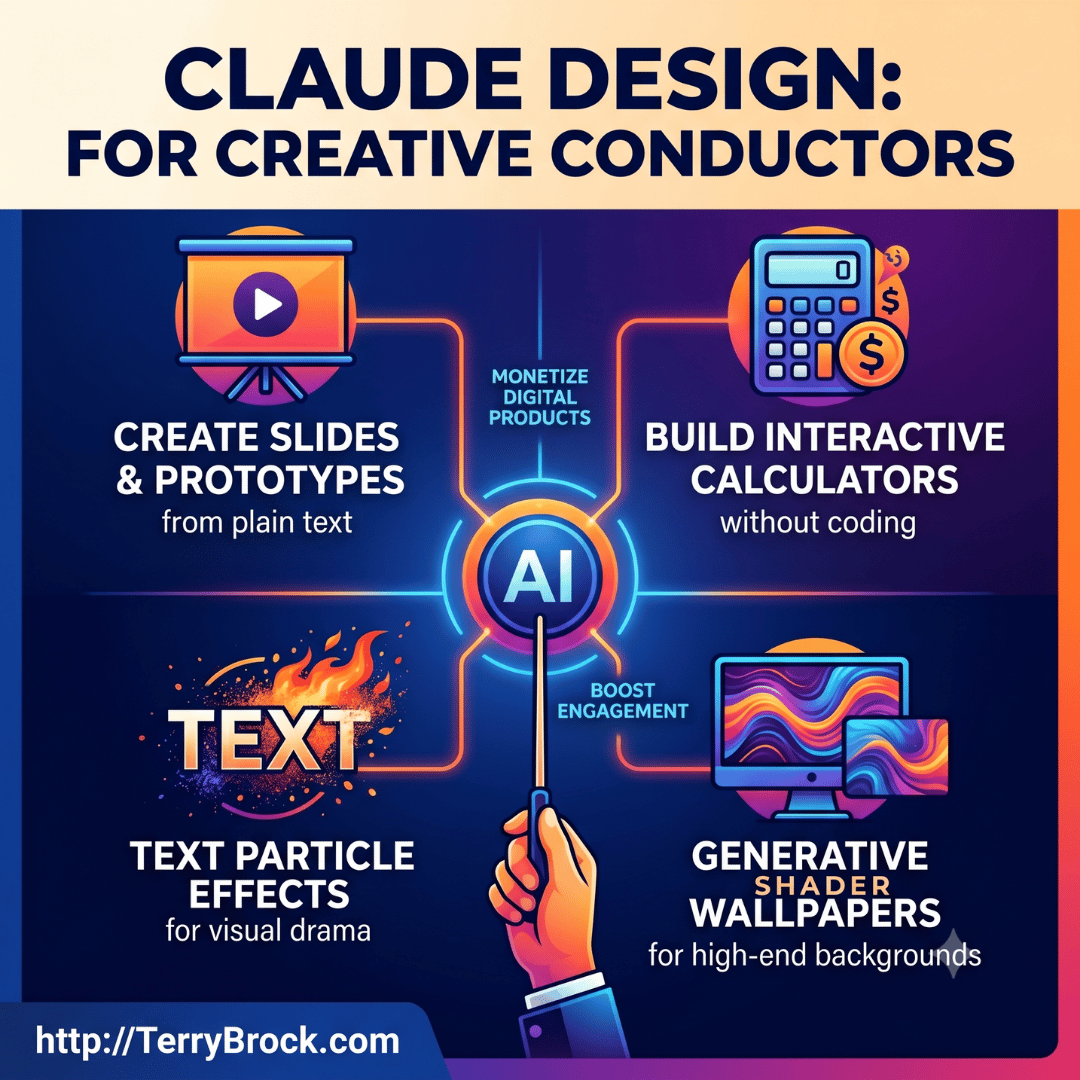
You’ll see practical ways to use Claude Design for slides, animations, visual effects, calculators, prototypes, and business-building content without needing a design degree or a giant creative team.
Recommended AI tools for business growth.
[http://AItools4biz.com](http://AItools4biz.com)
Listen to this & other episodes on our podcast
[https://bit.ly/sre_podcast](https://bit.ly/sre_podcast)
Chapters
0:00 Hook – How Claude Design can help creators build better visuals
0:41 Finding Claude Design – Where the new feature appears inside Claude
1:01 Slides And Presentations – Why this matters for speakers and creators
2:02 Animation Options – Add movement and energy to your content
3:13 Calculator Kit – Create useful tools for clients and prospects
4:29 Text Particle Effects – Make words visually pop in videos and presentations
6:16 Shader Wallpapers – Create dynamic backgrounds that keep attention
7:47 Globe Loader – Use motion graphics for global business ideas
8:47 Cosmic Scale Animation – Show big-picture perspective with visual impact
9:27 Organic Loaders – Keep presentations polished during transitions10:50 Iridescent Cards – Highlight key ideas with modern visual design
11:24 Text Streaming – Show AI-style responses in a more engaging way
12:43 Claude Design Slideshow Demo – See what Claude created from simple text
15:09 Monetization Ideas – Turn AI visuals into business assets
17:07 Final Thoughts – Like, share, subscribe, and try the tools yourself
What Claude Design Is
In this video, I walk through Claude Design, a new feature that helps turn plain-language ideas into visual assets.
I show how it can help you create slides, documents, prototypes, animations, visual effects, and other polished materials that can support your content and business.
Why This Matters For Creative Conductors
As a Creative Conductor, you’re not just using one AI tool.
You’re orchestrating several tools together to create videos, presentations, emails, podcasts, blog posts, and business assets. Claude Design gives you another instrument in that orchestra, especially when you need visuals fast.
Slides, Presentations, And Business ContentI show how Claude Design can help create presentation slides that can be exported and used with tools like PowerPoint, Keynote, Canva, PDFs, HTML, and other workflows.
This is especially useful for professional speakers, coaches, consultants, trainers, and content entrepreneurs who need to turn ideas into usable visuals quickly.
Animation And Visual Effects
Wait till you see this! WOW!
We look at several visual examples inside Claude Design, including text particle effects, shader wallpapers, globe loaders, cosmic scale animations, organic loaders, iridescent cards, and text streaming.
These can be useful for YouTube intros, presentation transitions, landing pages, email headers, product demos, and educational content.
Practical Business Uses
The big opportunity here is not just making things look pretty.
The real value is using Claude Design to create business-building assets such as pitch decks, lead magnets, client visuals, offer pages, social content, prototypes, calculators, and training materials.
Monetization Ideas
This is most important for you and me!
If you serve clients, this opens up some interesting possibilities. You could use AI-assisted design to build digital products, improve your presentations, create better proposal materials, develop client education tools, or produce more engaging content that supports your offers.
My TakeawayClaude Design is still something I’m exploring, but I can already see serious potential here for entrepreneurs and creators who want to move faster, communicate more clearly, and make their content more visually compelling. Try it, experiment with it, and think about how it could fit into your own content creation workflow.
What do you think? How would you use Claude Design in your own business, videos, presentations, or client work? Leave a comment and let me know.
Please like this video, share it with another creator or entrepreneur, and subscribe for more practical ideas on using AI tools to grow your business.
I’m Terry Brock with Stark Raving Entrepreneurs. Thanks for joining me today, my friend. Woo hoo — now go orchestrate something great.
For your convenience, here’s a full transcript of this episode;
Terry Brock [00:00:00]:
Have you seen what they’ve done over at Claude now with a new feature called design? They just released this, yesterday as I’m recording this, and it is amazing for creating the kind of graphs that you can use for monetizing and many different tools that are available that are just, oh my goodness, off the charts. Kinda like Claude does for many different things. We’re gonna show you in this video. I’m gonna sit down and go through some of the things just sharing it with you. Because, hey, we just are seeing I’m just seeing it myself right now. First, I wanna show you some of the things that are there that you can use as a content creator, as a creative conductor to be able to start putting that together. That’s what we talk about at Starkraving Entrepreneurs. I’m Terry Brock, and we talk about these things here, and I’m gonna show you what can do it.
Terry Brock [00:00:41]:
So let’s go ahead and get right into it. Here we are in Claude, and I’m looking at this right now in the golden hour. You’ll notice right over here on the left side, you’ll see something brand new here, design. Design is now a new feature that’s in there right underneath code. And then when you look at that and you say, okay. Well, let’s take a look at design and what it is all about. And then I’m clicking on it right now. And when I do, notice what happens.
Terry Brock [00:01:01]:
It shows me I get some, information where I can start a file here. I can look at some slides. I have tried this with creating slides. I gotta tell you, this thing is pretty amazing what it does. I do a lot of presentations. And if you’re creating graphics using PowerPoint or I’m on the Mac side, so we use a lot of Keynote, this is phenomenal. I see the capability of using this and great. And I also use Gamma, a wonderful product.
Terry Brock [00:01:27]:
I love it. Gamma gives me the ability to do a few extras, and I found sometimes you might wanna use these new features with Claude and Gamma and get even better presentations all the way around. Sometimes you’ll wanna use Google Slides. That’s another feature in this. So just broadening your ideas of what you can do with it and the capabilities here. You also have new product wireframe, product prototypes you can put together, and the wireframes as well. All of this available here and documents so that you can then start putting together some of the different documents that are available with PDFs and with resumes. And here’s one that’s really nice.
Terry Brock [00:02:02]:
This is animation. The animation gives you the ability to do quite a few things, I think, pretty handily and getting a chance to see. I’m gonna show you a couple examples of how you can use that and what it’s, really good for. If you’re doing presentations, this is something you definitely wanna look into. And then, of course, we can do a blank canvas and get a lot of new features in there with that. You’ll see that, up here at the top, let’s take a look at some of the features they have here on Claude Design. Now I’m looking into this just like you are first time here. We can see what’s available.
Terry Brock [00:02:31]:
These are some of the recent things that I put together. And you’ll see down here in the bottom, I’ve been working on a few things that I put together, some, graphics, some slides, things like that that look really, really nice. But I think what you wanna take a look at first is take a look at some of these examples, the examples that they give you and how you can use these and what’s available. Now you’ll see on this one right here, you can create a calculator. And I thought, why would I wanna do that? And then when I went to Claude and I said, why would people wanna use that? It gave me some really good ideas as to why they would want to do it. And let’s have some fun with this. What I’ve got is my phone here. I’m gonna be using my Samsung s 26 ultra using that.
Terry Brock [00:03:13]:
I’m gonna ask you some questions about this and here we are. Hey, Claude. I wanna ask you about design. It’s in there. I’m looking at it right now. I’ve got a lot of my friends joining me right here on, video and I see there’s a feature over here here under examples called the calculator kit. What the heck is the calculator kit?
Speaker B [00:03:33]:
Hey, Terry. So the calculator kit is basically a pre built set of components that lets you create interactive calculators without having to code from scratch. Think of it like a template library, that you’ve got buttons, display screens, input fields, all wired up and ready to go so you can drop them into a design and customize them for whatever calculation you need.
Terry Brock [00:03:49]:
Let me ask you this. Give me some examples of where it would be used in the real world. Like with mortgage maybe, with banks, or someone who’s got, student loans or something like that. Would that be some examples?
Speaker B [00:04:02]:
Absolutely. Yeah. So mortgage calculators are a perfect example. Banks and lenders use them all the time to let customers punch in loan amount, interest rate, and term to see what their monthly payment would be. Student loan calculators work the same way, showing borrowers what they owe month to month based on different repayment plans. You’d also see them for things like retirement savings calculators, investment return projections, cost of living comparisons.
Terry Brock [00:04:22]:
Okay. Okay. It sounds good. Thank you. I appreciate that. And but what I wanna do hang on just a second. I’m talking here. So I will do that and move it down.
Terry Brock [00:04:29]:
And what I wanna do is I’m gonna slide down here to the next one, which I think is even better. So let’s take a look at this. This next one here that I’m looking at is something called text particle effects. Tell me about that. What is it? It looks pretty snazzy.
Speaker B [00:04:44]:
Right. So text particle effects breaks your text into animated particles. Think of letters and words fragmenting into little pieces that can burst, swirl, fade, or reassemble. It’s pure visual drama. For you, this could be fantastic for video intros, landing pages, or email newsletter headers where you want that wow factor to stop people in their tracks and actually pay attention to what you’re saying?
Terry Brock [00:05:04]:
I think there’s some real capabilities. In fact, I can see right here, we’re looking at the one that says the dragon breathed fire, and we’re seeing the fire in there pretty big. And it said, end of the cold night and smoke. And we’re seeing smoke coming from that curled around his metal scales, a bitter wind, corraded sparks across the snow plains where it goes on and on from there. I’m thinking this could be really good in presentations as well as, in videos. What do you think?
Speaker B [00:05:32]:
Oh, man. You’re spot on. That’s exactly the kind of thing that would work beautifully in your keynotes. Imagine opening a slide with that fire breathing dragon text effect while you’re talking about orchestrating AI tools or the creative conductor framework.
Terry Brock [00:05:46]:
Yeah. Exactly. I think that’s good. That is good. Well, think about the capabilities with that. Where you could use this, one of those things that’s the animation. And it’s just something extra. Now could we do that with some other tools? Yeah.
Terry Brock [00:05:57]:
It’d take a lot of work though, but now we can do it pretty easily and do some, other things. Now they give you some other examples too. Like, for instance, here’s one that’s called app, onboarding. I think that’s pretty, simple. You just create an app right here. You can actually do it within, the design, lets you do that. I think that’s kinda nice. That’s something I’ve done a lot, but I think it could be good.
Terry Brock [00:06:16]:
Here’s another one I think is pretty nice called the shader wallpapers. Now this one is interesting. Let’s go back and ask Claude about this one here as well. One moment. Okay. Now I’m looking at the shader wallpapers. Tell me a little bit about that. It looks interesting.
Terry Brock [00:06:30]:
Tell me how we would use this and particularly how creative conductors and how we, those of us that are doing content creation can use it as well.
Speaker B [00:06:41]:
So shader wallpapers are basically animated generative visual backgrounds. These code to create dynamic, flowing patterns, gradients, and effects that evolve in real time. Think swirling colors, liquid motion, geometric patterns that shift and breathe on their own. For you as a creative conductor, this is gold for video backgrounds, landing pages, or email newsletter headers. You get that polished premium visual vibe without needing to shoot footage or hire a designer. Drop it behind your navy and orange branding, and you’ve got something that looks high end and keeps viewers engaged while you’re delivering the message. Yeah.
Terry Brock [00:07:11]:
I see something out here. I’ve clicked on the right. It says, Celbloom. That’s c e l l b l o o m. Celbloom. It’s got a moving background. It looks kinda interesting. That might be a fun background to put into a YouTube video in the right circumstances.
Terry Brock [00:07:25]:
Is that am I on the right track here?
Speaker B [00:07:28]:
Yeah. You’re absolutely on the right track. Cell bloom would be perfect as a dynamic background layer in a YouTube video, especially for something like an intro sequence or a segment where you’re breaking down a concept. The organic flowing movement gives it a living quality that keeps the eye engaged while you’re talking, and it’s way more interesting than a static background or just your face on camera the whole time.
Terry Brock [00:07:47]:
Yeah. I see what you’re saying. That makes a lot of sense. Now I wanna slide down here to this next one. I’m really fascinated with this. This. It says a globe loader. Because I click on this right here and it says use this problem.
Terry Brock [00:07:56]:
I’m gonna click here to see what it looks like. And there we are. Look at that. It’s got the globe spinning around. That looks kinda nice. Tell me a little bit more about that.
Speaker B [00:08:06]:
So a globe loader is basically an animated spinning globe at sea?
Terry Brock [00:08:10]:
Yeah. I think that’s it. Makes sense. So you could just say, okay, we’re in a big world and our world is spinning around, something like that. Are there some other applications that I’m not seeing right now?
Speaker B [00:08:22]:
Absolutely. So beyond the visual metaphor of the world is spinning, you could use it to represent global reach, like when you’re talking about how your AI tools work worldwide or how your audience spans different countries. It’s also great for loading screens or transitions between segments in a video, giving viewers something to watch while you’re pulling up your next point. And honestly, for the SRE brand, it could work as a visual anchor when you’re discussing international business trends or how entrepreneurship is borderless in the AI era.
Terry Brock [00:08:47]:
Yeah. That makes sense. So like you say SRE, that’s our stark raving Entrepreneurs, our group that does a lot with that. So thank you. I appreciate that. Now there’s another one down here. It says cosmic scale animation. That looks interesting.
Terry Brock [00:08:59]:
Tell me, what is that all about?
Speaker B [00:09:02]:
Cosmic scale animation is basically showing movement or change across massive mind bending scales and zooming from a single atom all the way out to the entire universe or vice versa. It creates this sense of perspective and wonder, showing how things fit into the bigger picture. For your content, this could be powerful when you’re talking about how AI is transforming entire industries or how individual entrepreneurs fit into the broader business ecosystem. It’s the visual equivalent of stepping back and showing the scope of what’s happening. I like it.
Terry Brock [00:09:27]:
That sounds good. And then let’s see. I think think there’s another one here, organic loaders. What in the world is that?
Speaker B [00:09:36]:
Organic loaders are animated loading indicators that have that natural flowing, almost biological feel to them. Like, pulsing shapes, breathing effects, or or liquidy movements that look alive rather than mechanical. They’re typically used while content is loading or processing in the background.
Terry Brock [00:09:51]:
I like that word you use liquidy. I like that liquidy kind of movement. It sounds kind of fun.
Speaker B [00:09:59]:
Right. That liquidy vibe has this organic, almost hypnotic quality to it. It feels premium and smooth without being too stiff or corporate. Perfect for your brand, honestly.
Terry Brock [00:10:07]:
Yeah. Give me an example. What would be an example where we could use that, say, in a, presentation where you’re using Keynote or PowerPoint and you wanna make a point? What would be a couple of hypothetical examples?
Speaker B [00:10:19]:
So imagine you’re doing a Keynote on the Creative Conductor framework, and you’re walking through how different AI tools work together. You could use an organic loader to transition between each tool. You’re introducing heat. That liquidy movement keeps the energy flowing while you’re shifting gears. Or say you’re presenting to executives and you wanna show real time data or a live live demo of an AI workflow. Drop an organic loader on screen while you’re pulling up the tool. And it keeps people visually engaged instead of staring at a blank slide. It buys you time and keeps the presentation feeling dynamic and polished.
Terry Brock [00:10:50]:
I like that. I think that’s really important that we can, buy time, keep it going that way. And I see here you have an iridescent card. What in the world is that?
Speaker B [00:11:00]:
So an iridescent card is basically a card element. Think like a content blocker button that has that shimmery color shifting quality. Like oil and water or soap bubble. Colors shift and change as you move or interact with it, giving it this premium eye catching feel. For presentations or landing pages, you could use iridescent cards to highlight key takeaways, feature your different AI tools, or showcase client results. It draws the eye naturally and feels modern and sophisticated without being over the top.
Terry Brock [00:11:24]:
Okay. That looks pretty good. Now I’m thinking this one down here below that could be even more helpful. Text streaming. I like this. This is a responsive grid, animate to different text streaming animations for a chat app, etcetera. Tell me about that. And what it is, I see right now, it’s got the thing in here about Paris, and it says the capital of, France is Paris, etcetera, as it spells it out.
Terry Brock [00:11:46]:
Tell me a little bit more about how we would use this.
Speaker B [00:11:50]:
Text streaming is that effect you see in chat g p t or Claude, where text appears character by character like it’s being typed out in real time. It creates this sense of live conversation and immediacy. Feels like an AI is thinking and responding right before your eyes. For your content, this could be killer in videos where you’re showing AI tool workflows or demos. Instead of just showing a static screenshot, you animate text appearing as if the AI is actually generating it live, which makes it way more engaging and shows the real time magic of what these tools actually do.
Terry Brock [00:12:21]:
Alright. Well, that sounds pretty good. I like it. I think there’s a lot of capabilities with that. And we appreciate you stopping by here, mister Claude, to, help us out on it. So you see there’s a lot of capability, my friend, when you look at the capabilities of this and what it can do for you. It is pretty amazing. And I wanna show you one of the thing that we did before I let you go and see what we did here with a slideshow.
Terry Brock [00:12:43]:
I took some information, some some text that I had that I did some research on, just threw it in there, and within about a minute, two minutes or so, it came up with this slideshow. Let me show you that. Okay. So here we are. I’m in Keynote right now on my Mac like PowerPoint. I’m using this. And this is what Claude gave me when I asked to do it today. Just real quick, it came in here.
Terry Brock [00:13:02]:
Claude Design, creative conductors, newest instrument. We talk about being a creative conductor, kinda like a conductor of an orchestra who is managing the different tools. That’s what you’re doing with this. You can turn plain language conversation into polished on brand sellable visuals. No design degree required. Main thing I want you to see is what it does and how it can use this for many different applications. You’ll see here. So it says, what is Claude Design? Well, Claude Design is powered by Claude Opus 4.7.
Terry Brock [00:13:30]:
It’s a research preview included with Claude, Mac. Now this does require payment. I’m on the pro program myself at $20 a month, and by the way, well worth it. And, getting a lot of good things there. And it’s built for everyone, kinda nice and what it does there and the way it puts it together, what you can actually build, pitch decks and slides. I tried that. And as a professional speaker who’s been doing it for, let’s see, forty three years plus, I’m off to a good start on that. But, doing that long, I’m impressed with what it can do here.
Terry Brock [00:14:01]:
One page and lead magnets, social and campaign visuals, interactive prototypes, all of this available here. And then you can put this how it works. You can describe it here. Let me show you this here. Describe and refine and then ship. You can ship this thing, get it out there, and get action with it because it starts with describing it, then you have your Claude builds, then you’ll have your, refining live. So you can look at it and look at this here. We can give you, all kinds of output on this so that you can use it in different ways for Canva, for PDFs, being able to use it in PowerPoint.
Terry Brock [00:14:35]:
This is where it will create the PowerPoint presentation for you. And, of course, if you’re using Keynote over on the Mac like I am, you just create the PowerPoint presentation. And, of course, you can bring it in there. It works out very nicely. And you’ll see down here we have a a standalone HTML and internal link and the Claude code handoff, all that kind of stuff. And it’s probably one of those things you’re not gonna use every element of it, but it’s got some really nice features here that give you capabilities. And so it’s something that’s fresh, hot off the press on 06/17/2026. However long you’re seeing this later, you’ll see it.
Terry Brock [00:15:09]:
And you see it shows me the design, the system, imports. It has direct canvas editing, so I can go into Canva, on the Canvas on this is a Canvas, not Canva. Canvas here so I can work with it. Two way classic code sync and more export options. In other words, thing is packed full of a lot of goodies in here with some good things for you. And so as a creative conductor, you got a monetization playbook on this here. So you can start using it for some major things here, self, sell digital products, land brand deals, being think about how you can use this to help others. Think about people that are gonna need this kind of thing to help, get their business going in some serious specific ways.
Terry Brock [00:15:51]:
You’re gonna be able to help them with that in a big way. And you’ll also be able to build your offer pages and, have your products and services that are available, all of that available. So it’s your move, Conductor. You’re gonna be able to use this in several different ways. You can start designing right now at claw.ai/design, and this is for the paid program that you’ll need. It gives you a lot of capabilities. It’s with clawed pro, max, team, and enterprise. You can, bring an idea, transcript, rough outline.
Terry Brock [00:16:22]:
That’s one of the things, by the way, I really particularly liked about it because what I could do is I could bring in some text, type it in there, or what I did is I went back and experimenting in preparing this video, and I got a lot of different ideas in text. I took the email that I sent out today, put that together, took just the text of that, and it created a very nice show with it. So I think we’ve got some really good capabilities here with all that. And, it is pretty new nice here where it said, I like the way it typed into something I say often. Woo hoo. It’s got now you can orchestrate something and can make it work. So this is something, my friend, you wanna take a look at. If you’re a creator, a conductor who is conducting your own orchestra, if we will, of different tools that are available with AI.
Terry Brock [00:17:07]:
This can help you a lot. We’re gonna be doing that and helping people in many different ways with it. And by the way, here’s how you can help yourself even more. Like this video so that then when we have some other videos like this, you’ll be able to help that, be able to get those notices right off the bat as it comes out like this real quickly. And share this with others because they’re gonna love you for sharing it and being able to do that. And subscribe. That helps us a lot. We really different tools.
Terry Brock [00:17:39]:
AI tools for biz. That’s the number four. AI tools for biz, biz,.com. And you’ll see right above me here, if you’re catching on video, there’s a QR code that you can use to get even more goodies on this. This is there. There’s no charge for it whatsoever. You can get that, and then it’s updated so you can you and your team can realize, oh, new things are coming out. I wanna get that.
Terry Brock [00:18:02]:
I wanna start doing a little bit more with it in some other ways and make this work in a big way. So a lot of good coming to you on this with Claude Design. It is available, and I’d love to hear from you. Please leave a comment down below. Let us know what you think of this thing and how you would use it. And we’ve got some other videos here. They’re gonna help you specifically learn how to use some of these tools with Claude and with others. I’m Terry Brock with Star Craving Entrepreneurs.
Terry Brock [00:18:28]:
Thank you very much for joining me today. I am really looking forward to hearing from you on this one.
And for our Spanish speaking friends:
Terry Brock :
¿Han visto lo que han hecho allá en Claude ahora con una nueva función llamada diseño? Acaban de lanzar esto, ayer mientras grabo esto, y es increíble para crear el tipo de gráficos que puedes usar para monetizar y muchas herramientas diferentes que están disponibles que son simplemente, ¡oh, por Dios!, fuera de serie. Un poco como lo hace Claude para muchas cosas diferentes. Se lo vamos a mostrar en este video. Me voy a sentar y a revisar algunas de las cosas simplemente compartiéndolo con ustedes. Porque, oigan, recién estamos viendo, yo mismo lo estoy viendo justo ahora. Primero, quiero mostrarles algunas de las cosas que están ahí que pueden usar como creadores de contenido, como directores creativos para poder empezar a armar eso. De eso es de lo que hablamos en Starkraving Entrepreneurs. Soy Terry Brock, y hablamos de estas cosas aquí, y les voy a mostrar qué puede hacerlo.
Terry Brock :
Así que vamos a seguir adelante y entrar de lleno en ello. Aquí estamos en Claude, y estoy mirando esto justo ahora en la hora dorada. Notarán justo aquí a la izquierda, verán algo completamente nuevo aquí, diseño. Diseño es ahora una nueva función que está ahí justo debajo de código. Y luego, cuando miras eso y dices, de acuerdo. Bueno, echemos un vistazo a diseño y de qué se trata todo esto. Y entonces estoy haciendo clic en ello justo ahora. Y cuando lo hago, noten lo que pasa.
Terry Brock :
Me muestra que obtengo algo de, información donde puedo comenzar un archivo aquí. Pueden mirar algunas diapositivas. He probado esto creando diapositivas. Tengo que decirles, esta cosa es bastante increíble en lo que hace. Hago muchas presentaciones. Y si están creando gráficos usando PowerPoint o yo estoy del lado de Mac, así que usamos mucho Keynote, esto es fenomenal. Veo la capacidad de usar esto y genial. Y también uso Gamma, un producto maravilloso. Me encanta. Gamma me da la capacidad de hacer algunos extras, y descubrí que a veces podrías querer usar estas nuevas funciones con Claude y Gamma y obtener presentaciones aún mejores en todos los sentidos. A veces querrás usar Google Slides. Esa es otra función en esto. Así que simplemente ampliando sus ideas de lo que pueden hacer con ello y las capacidades aquí. También tienen bocetos (wireframes) de nuevos productos, prototipos de productos que pueden armar, y los wireframes también. Todo esto disponible aquí y documentos para que luego puedan comenzar a armar algunos de los diferentes documentos que están disponibles con PDF y con currículums. Y aquí hay uno que es realmente agradable.
Terry Brock :
Esto es animación. La animación les da la capacidad de hacer bastantes cosas, creo, con bastante facilidad y tener la oportunidad de ver. Les voy a mostrar un par de ejemplos de cómo pueden usar eso y para qué es, realmente bueno. Si están haciendo presentaciones, esto es algo que definitivamente querrán investigar. Y luego, por supuesto, podemos hacer un lienzo en blanco y obtener un montón de funciones nuevas allí con eso. Verán eso, aquí arriba en la parte superior, echemos un vistazo a algunas de las funciones que tienen aquí en Claude Design. Ahora estoy investigando esto tal como ustedes, por primera vez aquí. Podemos ver qué hay disponible.
Terry Brock :
Estas son algunas de las cosas recientes que armé. Y verán aquí abajo en el fondo, he estado trabajando en algunas cosas que armé, algunos, gráficos, algunas diapositivas, cosas así que se ven muy, muy bien. Pero creo que lo que quieren mirar primero es echar un vistazo a algunos de estos ejemplos, los ejemplos que les dan y cómo pueden usar estos y qué hay disponible. Ahora verán en este de aquí mismo, pueden crear una calculadora. Y pensé, ¿por qué querría hacer eso? Y luego, cuando fui a Claude y dije, ¿por qué la gente querría usar eso? Me dio algunas ideas realmente buenas de por qué querrían hacerlo. Y divirtámonos un poco con esto. Lo que tengo es mi teléfono aquí. Voy a estar usando mi Samsung s 26 ultra usando eso. Te voy a hacer algunas preguntas sobre esto y aquí estamos. Hola, Claude. Quiero preguntarte sobre diseño. Está ahí dentro. Lo estoy mirando justo ahora. Tengo a muchos de mis amigos acompañándome aquí mismo en, video y veo que hay una función por aquí, aquí bajo ejemplos, llamada el kit de calculadora. ¿Qué demonios es el kit de calculadora?
Terry Brock: :
Hola, Terry. Así que el kit de calculadora es básicamente un conjunto preconstruido de componentes que te permite crear calculadoras interactivas sin tener que programar desde cero. Piénsalo como una biblioteca de plantillas, donde tienes botones, pantallas de visualización, campos de entrada, todo conectado y listo para usar de modo que puedas soltarlos en un diseño y personalizarlos para cualquier cálculo que necesites.
Terry Brock :
Déjame preguntarte esto. Dame algunos ejemplos de dónde se usaría en el mundo real. Como con una hipoteca tal vez, con bancos, o alguien que tiene, préstamos estudiantiles o algo así. ¿Serían esos algunos ejemplos?
Terry Brock: :
Absolutamente. Sí. Así que las calculadoras de hipotecas son un ejemplo perfecto. Los bancos y los prestamistas las usan todo el tiempo para permitir que los clientes ingresen el monto del préstamo, la tasa de interés y el plazo para ver cuál sería su pago mensual. Las calculadoras de préstamos estudiantiles funcionan de la misma manera, mostrando a los prestatarios lo que deben mes a mes en función de diferentes planes de pago. También las verías para cosas como calculadoras de ahorros para la jubilación, proyecciones de rendimiento de inversiones, comparaciones de costo de vida.
Terry Brock :
De acuerdo. De acuerdo. Suena bien. Gracias. Te agradezco eso. Y pero lo que quiero hacer, espera solo un segundo. Estoy hablando aquí. Así que haré eso y lo moveré hacia abajo.
Terry Brock :
Y lo que quiero hacer es que me voy a deslizar hacia abajo aquí al siguiente, que creo que es aún mejor. Así que echemos un vistazo a esto. Este siguiente aquí que estoy mirando es algo llamado efectos de partículas de texto. Cuéntame sobre eso. ¿Qué es? Se ve bastante elegante.
Terry Brock: :
Correcto. Así que los efectos de partículas de texto dividen tu texto en partículas animadas. Piensa en letras y palabras fragmentándose en pequeños pedazos que pueden estallar, arremolinarse, desvanecerse o volver a ensamblarse. Es puro drama visual. Para ti, esto podría ser fantástico para intros de video, páginas de destino (landing pages) o encabezados de boletines informativos por correo electrónico donde quieres ese factor “wow” para detener a las personas en seco y hacer que realmente presten atención a lo que estás diciendo.
Terry Brock :
Creo que hay algunas capacidades reales. De hecho, puedo ver aquí mismo, estamos mirando el que dice que el dragón exhaló fuego, y estamos viendo el fuego allí bastante grande. Y decía, fin de la noche fría y humo. Y estamos viendo humo saliendo de eso, enroscándose alrededor de sus escamas de metal, un viento amargo, esparciendo chispas a través de las llanuras de nieve donde continúa y continúa a partir de ahí. Estoy pensando que esto podría ser realmente bueno en presentaciones, así como también en videos. ¿Qué piensas?
Terry Brock: :
¡Oh, hombre! Diste en el clavo. Ese es exactamente el tipo de cosas que funcionaría maravillosamente en tus ponencias (keynotes). Imagina abrir una diapositiva con ese efecto de texto de dragón que exhala fuego mientras estás hablando sobre orquestar herramientas de IA o el marco del director creativo.
Terry Brock :
Sí. Exacto. Creo que eso es bueno. Eso es bueno. Bueno, piensa en las capacidades con eso. Dónde podrías usar esto, una de esas cosas que es la animación. Y es solo algo extra. Ahora, ¿podríamos hacer eso con algunas otras herramientas? Sí.
Terry Brock :
Aunque requeriría mucho trabajo, pero ahora podemos hacerlo con bastante facilidad y hacer algunas otras cosas. Ahora también te dan algunos otros ejemplos. Como, por ejemplo, aquí hay uno que se llama incorporación (onboarding) de la aplicación. Creo que eso es bastante, simple. Simplemente creas una aplicación aquí mismo. De hecho, puedes hacerlo dentro de, el diseño, te permite hacer eso. Creo que eso es un poco agradable. Eso es algo que he hecho mucho, pero creo que podría ser bueno.
Terry Brock :
Aquí hay otro que creo que es bastante agradable llamado los fondos de pantalla de sombreadores (shader wallpapers). Ahora este es interesante. Regresemos y preguntémosle a Claude sobre este de aquí también. Un momento. De acuerdo. Ahora estoy mirando los fondos de pantalla de sombreadores. Cuéntame un poco sobre eso. Se ve interesante.
Terry Brock :
Dime cómo usaríamos esto y particularmente cómo los directores creativos y cómo nosotros, los que estamos haciendo creación de contenido, podemos usarlo también.
Terry Brock: :
Así que los fondos de pantalla de sombreadores son básicamente fondos visuales generativos animados. Usan código para crear patrones dinámicos y fluidos, degradados y efectos que evolucionan en tiempo real. Piensa en colores arremolinados, movimiento líquido, patrones geométricos que cambian y respiran por sí mismos. Para ti como director creativo, esto es oro para fondos de video, páginas de destino o encabezados de boletines informativos por correo electrónico. Obtienes esa vibra visual pulida y premium sin necesidad de filmar metraje o contratar a un diseñador. Colócalo detrás de tu marca azul marino y naranja, y tendrás algo que se ve de alta gama y mantiene a los espectadores interesados mientras entregas el mensaje. Sí.
Terry Brock :
Veo algo por aquí. He hecho clic a la derecha. Dice, Celbloom. Eso es c e l l b l o o m. Celbloom. Tiene un fondo en movimiento. Se ve un poco interesante. Ese podría ser un fondo divertido para poner en un video de YouTube en las circunstancias adecuadas.
Terry Brock :
¿Es eso, estoy en el camino correcto aquí?
Terry Brock: :
Sí. Estás absolutamente en el camino correcto. Cell bloom sería perfecto como una capa de fondo dinámica en un video de YouTube, especialmente para algo como una secuencia de introducción o un segmento donde estás desglosando un concepto. El movimiento fluido y orgánico le da una cualidad viva que mantiene la mirada atenta mientras hablas, y es mucho más interesante que un fondo estático o solo tu rostro en la cámara todo el tiempo.
Terry Brock :
Sí. Veo lo que estás diciendo. Eso tiene mucho sentido. Ahora quiero deslizarme hacia abajo aquí a este siguiente. Estoy realmente fascinado con esto. Esto. Dice un cargador de globo (globe loader). Porque hago clic en esto aquí mismo y dice usar este problema. Voy a hacer clic aquí para ver cómo se ve. Y ahí estamos. Miren eso. Tiene al globo girando. Eso se ve un poco agradable. Cuéntame un poco más sobre eso.
Terry Brock: :
¿Así que un cargador de globo es básicamente un globo giratorio animado en el mar?
Terry Brock :
Sí. Creo que eso es todo. Tiene sentido. Así que podrías simplemente decir, de acuerdo, estamos en un mundo grande y nuestro mundo está girando, algo así. ¿Hay algunas otras aplicaciones que no estoy viendo en este momento?
Terry Brock: :
Absolutamente. Así que más allá de la metáfora visual de que el mundo está girando, podrías usarlo para representar el alcance global, como cuando estás hablando de cómo tus herramientas de IA funcionan en todo el mundo o cómo tu audiencia se extiende por diferentes países. También es excelente para pantallas de carga o transiciones entre segmentos en un video, dándole a los espectadores algo que ver mientras preparas tu siguiente punto. Y honestamente, para la marca SRE, podría funcionar como un ancla visual cuando estés discutiendo tendencias de negocios internacionales o cómo el espíritu empresarial no tiene fronteras en la era de la IA.
Terry Brock :
Sí. Eso tiene sentido. Así que como dices SRE, esos son nuestros Stark Raving Entrepreneurs, nuestro grupo que hace mucho con eso. Así que gracias. Te agradezco eso. Ahora hay otro aquí abajo. Dice animación a escala cósmica. Eso se ve interesante.
Terry Brock :
Dime, ¿de qué se trata todo eso?
Terry Brock: :
La animación a escala cósmica es básicamente mostrar movimiento o cambio a través de escalas masivas y alucinantes, y hacer un zum (zoom) desde un solo átomo hasta el universo entero o viceversa. Crea esta sensación de perspectiva y asombro, mostrando cómo encajan las cosas en el panorama general. Para tu contenido, esto podría ser poderoso cuando estás hablando de cómo la IA está transformando industrias enteras o cómo los emprendedores individuales encajan en el ecosistema empresarial más amplio. Es el equivalente visual de dar un paso atrás y mostrar el alcance de lo que está sucediendo. Me gusta.
Terry Brock :
Eso suena bien. Y luego veamos. Creo, creo que hay otro aquí, cargadores orgánicos. ¿Qué demonios es eso?
Terry Brock: :
Los cargadores orgánicos son indicadores de carga animados que tienen esa sensación fluida natural, casi biológica. Como, formas palpitantes, efectos de respiración, o o movimientos líquidos que parecen vivos en lugar de mecánicos. Típicamente se usan mientras el contenido se está cargando o procesando en segundo plano.
Terry Brock :
Me gusta esa palabra que usas, líquido. Me gusta ese tipo de movimiento líquido. Suena un poco divertido.
Terry Brock: :
Correcto. Esa vibra líquida tiene esta cualidad orgánica, casi hipnótica. Se siente premium y suave sin ser demasiado rígido o corporativo. Perfecto para tu marca, honestamente.
Terry Brock :
Sí. Dame un ejemplo. ¿Cuál sería un ejemplo donde podríamos usar eso, digamos, en una, presentación donde estás usando Keynote o PowerPoint y quieres enfatizar un punto? ¿Cuáles serían un par de ejemplos hipotéticos?
Terry Brock: :
Así que imagina que estás haciendo una presentación (Keynote) sobre el marco del Director Creativo, y estás guiando a través de cómo funcionan juntas las diferentes herramientas de IA. Podrías usar un cargador orgánico para hacer la transición entre cada herramienta. Estás introduciendo calor. Ese movimiento líquido mantiene la energía fluyendo mientras cambias de marcha. O di que estás presentando ante ejecutivos y quieres mostrar datos en tiempo real o una demostración en vivo en vivo de un flujo de trabajo de IA. Suelta un cargador orgánico en la pantalla mientras abres la herramienta. Y mantiene a las personas visualmente interesadas en lugar de mirar una diapositiva en blanco. Te gana tiempo y hace que la presentación se siga sintiendo dinámica y pulida.
Terry Brock :
Me gusta eso. Creo que eso es realmente importante, que podamos, ganar tiempo, mantenerlo en marcha de esa manera. Y veo aquí que tienes una tarjeta iridiscente. ¿Qué demonios es eso?
Terry Brock: :
Así que una tarjeta iridiscente es básicamente un elemento de tarjeta. Piensa como un botón de bloqueador de contenido que tiene esa cualidad reluciente que cambia de color. Como aceite y agua o una burbuja de jabón. Los colores cambian y varían a medida que te mueves o interactúas con ella, dándole esta sensación premium y llamativa. Para presentaciones o páginas de destino, podrías usar tarjetas iridiscentes para resaltar conclusiones clave, presentar tus diferentes herramientas de IA o mostrar resultados de clientes. Atrae la mirada de forma natural y se siente moderna y sofisticada sin ser exagerada.
Terry Brock :
De acuerdo. Eso se ve bastante bien. Ahora estoy pensando que este de aquí abajo, debajo de ese, podría ser aún más útil. Transmisión de texto (text streaming). Me gusta esto. Esta es una cuadrícula receptiva, se anima a diferentes animaciones de transmisión de texto para una aplicación de chat, etcétera. Cuéntame sobre eso. Y lo que es, veo ahora mismo, tiene la cosa aquí sobre París, y dice que la capital de, Francia es París, etcétera, a medida que lo va deletreando. Cuéntame un poco más sobre cómo usaríamos esto.
Terry Brock: :
La transmisión de texto es ese efecto que ves en ChatGPT o Claude, donde el texto aparece carácter por carácter como si se estuviera escribiendo en tiempo real. Crea esta sensación de conversación en vivo e inmediatez. Se siente como si una IA estuviera pensando y respondiendo justo ante tus ojos. Para tu contenido, esto podría ser genial en videos donde estás mostrando flujos de trabajo o demostraciones de herramientas de IA. En lugar de solo mostrar una captura de pantalla estática, animas el texto apareciendo como si la IA realmente lo estuviera generando en vivo, lo que lo hace mucho más interesante y muestra la magia en tiempo real de lo que estas herramientas realmente hacen.
Terry Brock :
Muy bien. Bueno, eso suena bastante bien. Me gusta. Creo que hay muchas capacidades con eso. Y te agradecemos que pases por aquí, señor Claude, para, ayudarnos con esto. Así que ves que hay mucha capacidad, mi amigo, cuando miras las capacidades de esto y lo que puede hacer por ti. Es bastante increíble. Y quiero mostrarte una de las cosas que hicimos antes de dejarte ir y ver qué hicimos aquí con una presentación de diapositivas.
Terry Brock :
Tomé cierta información, un poco de texto que tenía sobre el cual investigué, simplemente lo arrojé ahí, y en aproximadamente un minuto, dos minutos más o menos, apareció con esta presentación de diapositivas. Déjenmen mostrarles eso. De acuerdo. Así que aquí estamos. Estoy en Keynote justo ahora en mi Mac, al igual que PowerPoint. Estoy usando esto. Y esto es lo que Claude me dio cuando le pedí que lo hiciera hoy. Así de rápido, entró aquí.
Terry Brock :
Claude Design, conductores creativos, el instrumento más nuevo. Hablamos de ser un director creativo, un poco como el director de una orquesta que está manejando las diferentes herramientas. Eso es lo que estás haciendo con esto. Puedes convertir una conversación en lenguaje sencillo en visuales pulidos, adaptados a la marca y vendibles. No se requiere título en diseño. Lo principal que quiero que vean es lo que hace y cómo puede usar esto para muchas aplicaciones diferentes. Verán aquí. Así que dice, ¿qué es Claude Design? Bueno, Claude Design funciona con Claude Opus 4.7.
Terry Brock :
Es un avance de investigación (research preview) incluido con Claude, Mac. Ahora, esto sí requiere un pago. Yo mismo estoy en el programa pro a $20 al mes, y por cierto, vale la pena. Y, obteniendo muchas cosas buenas allí. Y está diseñado para todos, algo agradable en lo que hace allí y la forma en que lo arma, lo que realmente puedes construir, presentaciones de negocios (pitch decks) y diapositivas. Probé eso. Y como orador profesional que lo ha estado haciendo durante, veamos, más de cuarenta y tres años, llevo un buen comienzo en eso. Pero, haciéndolo durante tanto tiempo, estoy impresionado con lo que puede hacer aquí.
Terry Brock :
Páginas de una sola hoja y lead magnets, visuales sociales y de campaña, prototipos interactivos, todo esto disponible aquí. Y luego puedes poner esto de cómo funciona. Puedes describirlo aquí. Déjenme mostrarles esto aquí. Describir y refinar y luego enviar. Puedes enviar esta cosa, sacarla allá afuera, y obtener acción con ella porque comienza con describirla, luego tienes tus versiones de Claude (Claude builds), luego tendrás tu, refinamiento en vivo. Así que puedes mirarlo y mirar esto aquí. Podemos darte, todo tipo de resultados en esto para que puedas usarlo de diferentes maneras para Canva, para PDF, pudiendo usarlo en PowerPoint.
Terry Brock :
Aquí es donde creará la presentación de PowerPoint para ti. Y, por supuesto, si estás usando Keynote allá en la Mac como yo, simplemente creas la presentación de PowerPoint. Y, por supuesto, puedes traerla allí. Resulta muy bien. Y verán aquí abajo que tenemos un HTML independiente y un enlace interno y la entrega de código de Claude (Claude code handoff), todo ese tipo de cosas. Y probablemente sea una de esas cosas de las que no vas a usar cada elemento, pero tiene algunas funciones muy agradables aquí que te dan capacidades. Y por lo tanto es algo que está fresco, recién salido de la prensa el 17/06/2026. Independientemente de cuánto tiempo después estés viendo esto, lo verás.
Terry Brock :
Y ves que me muestra el diseño, el sistema, las importaciones. Tiene edición directa en lienzo, así que puedo ir a Canva, en el Lienzo, en esto que es un Lienzo, no Canva. Lienzo aquí para que pueda trabajar con él. Sincronización bidireccional de código clásico y más opciones de exportación. En otras palabras, la cosa está repleta de un montón de sorpresas aquí con algunas cosas buenas para ti. Y así, como director creativo, tienes un libro de estrategias (playbook) de monetización sobre esto aquí. Así que puedes empezar a usarlo para algunas cosas importantes aquí, aut-, vender productos digitales, conseguir acuerdos con marcas, estar pensando en cómo puedes usar esto para ayudar a otros. Piensa en personas que van a necesitar este tipo de cosas para ayudar, a poner en marcha su negocio de algunas maneras específicas y serias.
Terry Brock :
Vas a poder ayudarlos con eso a lo grande. Y también podrás construir tus páginas de ofertas y, tener tus productos y servicios que estén disponibles, todo eso disponible. Así que es tu turno, Director. Vas a poder usar esto de varias maneras diferentes. Puedes empezar a diseñar ahora mismo en claw.ai/design, y esto es para el programa de pago que necesitarás. Te da muchas capacidades. Es con clawed pro, max, team y enterprise. Puedes, traer una idea, transcripción, bosquejo aproximado.
Terry Brock :
Esa es una de las cosas, por cierto, que realmente me gustó en particular de esto, porque lo que podía hacer era traer un poco de texto, escribirlo allí, o lo que hice fue regresar y experimentar al preparar este video, y obtuve muchas ideas diferentes en texto. Tomé el correo electrónico que envié hoy, armé eso, tomé solo el texto de eso, y creó un espectáculo muy agradable con ello. Así que creo que tenemos algunas capacidades realmente buenas aquí con todo eso. Y, es bastante nuevo y agradable aquí donde decía, me gusta la forma en que lo escribió en algo que digo a menudo. ¡Woo hoo! Tiene ahora puedes orquestar algo y puedes hacerlo funcionar. Así que esto es algo, mi amigo, a lo que quieres echar un vistazo. Si eres un creador, un director que está dirigiendo su propia orquesta, por así decirlo, de diferentes herramientas que están disponibles con IA.
Terry Brock :
Esto puede ayudarte mucho. Vamos a estar haciendo eso y ayudando a la gente de muchas maneras diferentes con ello. Y por cierto, así es como puedes ayudarte a ti mismo aún más. Dale “me gusta” a este video para que luego, cuando tengamos algunos otros videos como este, puedas ayudar a eso, a poder recibir esos avisos de inmediato a medida que salga así de rápido. Y comparte esto con otros porque te van a amar por compartirlo y poder hacer eso. Y suscríbete. Eso nos ayuda mucho. Nosotros realmente diferentes herramientas.
Terry Brock :
AI tools for biz. Ese es el número cuatro. AI tools for biz, biz, punto com. Y verán justo encima de mí aquí, si lo están viendo en video, hay un código QR que pueden usar para obtener aún más cosas buenas en esto. Esto está ahí. No tiene costo alguno en absoluto. Pueden obtener eso, y luego se actualiza para que tú y tu equipo puedan darse cuenta de, oh, están saliendo cosas nuevas. Quiero obtener eso.
Terry Brock :
Quiero empezar a hacer un poco más con ello de otras maneras y hacer que esto funcione a lo grande. Así que viene mucho de bueno para ustedes en esto con Claude Design. Está disponible, y me encantaría saber de ustedes. Por favor, dejen un comentario aquí abajo. Háganos saber qué piensan de esta cosa y cómo la usarían. Y tenemos algunos otros videos aquí. Les van a ayudar específicamente a aprender cómo usar algunas de estas herramientas con Claude y con otras. Soy Terry Brock con Star Craving Entrepreneurs. Muchas gracias por acompañarme hoy. Realmente tengo muchas ganas de saber de ustedes en esta ocasión.