You’re Sitting on a Content Gold Mine. NotebookLM Helps You Mine It Fast.
Most content creators don’t have an “idea problem.”
They have a retrieval problem.
If you’re a speaker, coach, consultant, author, podcaster, or YouTuber, chances are you already have years of valuable content sitting in interviews, old videos, transcripts, docs, and audio files. This episode shows you how to turn that archive into fresh, publish-ready assets with NotebookLM—without working a 26-hour day.
I’m Terry Brock, and in this walkthrough I share a practical workflow I use myself: taking existing content and turning it into audio explainers, short videos, mind maps, quizzes, infographics, and slide decks.
And yes… it’s pretty amazing what’s possible.
Quick Answer: What This Episode Helps You Do
- Repurpose old content into new formats, fast
- Cut research and prep time dramatically
- Publish more consistently (without burnout)
- Build training and marketing assets from what you already have
- Keep your human voice while using AI as your creative co-pilot
Why NotebookLM Matters Right Now
Let’s keep this real: creating everything from scratch every single week is a fast path to exhaustion.
NotebookLM gives you leverage.
You feed it strong source material, and it helps you produce multiple outputs from the same core ideas.
That means:
- more reach from the same message
- better consistency across platforms
- less wheel-reinventing and more momentum
In plain English: work smarter, not harder (and not crankier).
Real-World Case Study: Audio Cassette Wayne Dyer Interview Transformed through AI To A Modern Content Engine
In this episode, I use an interview I recorded years ago with psychologist Dr. Wayne Dyer.
Originally? Analog cassette.
Yea, I know — long time ago!
Now? Digitized audio, transcripted, analyzed, and repurposed into multiple modern content formats.
That’s the big takeaway:
If you have archives, you already have a content asset library.
You’re not starting behind—you’re starting loaded.
__________________________________________________
Watch, Listen, and Grab Resources
Recommended AI tools for business growth:
http://AItools4biz.com
Watch the video — You are going to LOVE this!
https://youtu.be/lBHe52fgueY
Listen to this and other episodes on the podcast:
https://bit.ly/sre_podcast
The Workflow I Use (Simple + Repeatable)
- Add your sources
Upload audio, transcripts, documents, PDFs, and links (including YouTube). - Blend viewpoints for better context
Mix your own materials with web sources and Drive files to get richer comparisons and stronger outputs. - Use chat prompts to extract insights
Ask focused questions, pull summaries, and save reusable notes. - Create studio outputs
Generate audio explainers, videos, mind maps, quizzes, flashcards, infographics, and draft slides. - Edit like a pro
AI accelerates. Humans finalize. (Good rule of thumb in creating content (video, audio-only, Blogs, email, ect.) And, of course because it is AI which makes mistakes (like us humans!) — always review for clarity, accuracy, and typos before publishing.
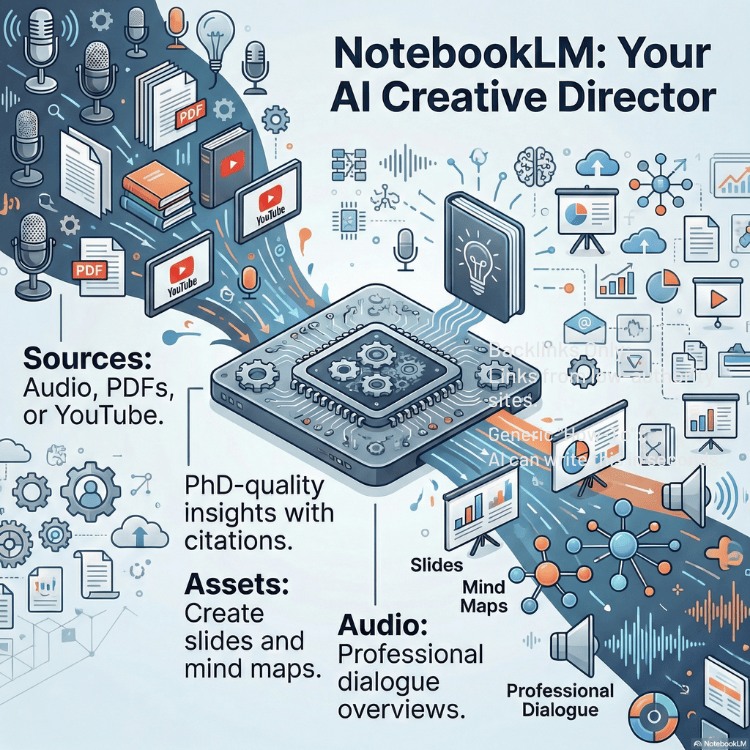
What You Can Build with NotebookLM
Here’s where this gets fun (and useful):
- Audio modes: overview, critique, and debate-style formats
- Video outputs: quick explainers and customizable summaries
- Mind maps: visualize complex ideas for teaching and learning
- Flashcards + quizzes: training tools for courses and teams
- Infographics + slide decks: distribution-ready assets for social, workshops, and client education
If you create content for YouTube, podcasts, newsletters, client onboarding, workshops, or courses… this is a serious multiplier.
Important Reality Check (Because We Need To Live In Reality)
AI can be brilliant.
AI can also be wrong, clunky, or typo-happy.
Boy, howdy, do i KNOW that from experience!
So here’s the Terry-ism version:
Trust, but verify. Then polish like a pro.
Use AI for acceleration.
Use your judgment for publication.
Yep! Keep that judgment thingy always ready to go in your hip pocket!
Who This Is Best For
This episode is especially useful for:
- Professional speakers
- Coaches and consultants
- Authors and educators
- Podcasters and YouTubers
- Content entrepreneurs who want more output with less chaos
If that sounds like you, this is your playbook.
Watch, Listen, and Grab Resources
Recommended AI tools for business growth:
http://AItools4biz.com
Watch the video:
https://youtu.be/lBHe52fgueY
Listen to this and other episodes on the podcast:
https://bit.ly/sre_podcast
Episode Chapters
- [0:00] Why most creators are wasting time
- [0:28] What’s new in NotebookLM
- [1:17] Episode roadmap
- [2:09] Wayne Dyer case study
- [4:07] Smarter source setup
- [5:41] Web + Google Drive comparisons
- [6:24] Fast research vs deep research
- [7:08] Prompting for insights
- [8:50] Studio audio tools
- [11:15] Studio video tools
- [13:20] Mind maps for teaching
- [16:04] Flashcards, quizzes, infographics
- [19:55] Slide generation + editing what AI misses
- [21:56] Interactive audio demo
- [23:09] Final takeaways + next steps
FAQ (AEO-Friendly)
What is NotebookLM best for?
NotebookLM is best for turning existing source material into useful summaries, insights, and repurposed content formats quickly.
Can NotebookLM use YouTube links and mixed sources?
Yes. You can combine links, documents, transcripts, and other sources to improve context and output quality.
Is NotebookLM useful for content repurposing?
Absolutely. It helps transform one core asset into multiple publishable formats for different platforms.
Do I still need to edit AI output?
Yes. Always. AI is a fast draft partner, not your final editor.
If you’re still creating from scratch every time, you’re not “being productive”—you’re being punished by your own process.
Let’s fix that.
Use the gold mine you already have.
#NotebookLM #ContentRepurposing #AICreatorTools #YouTubeStrategy #ContentMarketing #TerryBrock
Here’s a transcript for your convenience:
Terry Brock [00:00:00]:
Now is the time to stop wasting hours on research. You see, most creators of content are sitting on a gold mine and don’t even know it. I was surprised when I saw this. I wanna share with you what is happening with notebook LMs from from Google, and it is a fabulous program, and it’s free too. This is amazing. And if you’re not using it, well, then you’re leaving content on the table. The magic of it is that you can drop in a link, and you can watch video now. We didn’t used to be able to do that with it.
Terry Brock [00:00:28]:
You can do that now, so like, say, your YouTube video, and you’ll be able to do that with a podcast. You’re gonna be able to do it with a video script, a visual mind map it can create. It can create audio and video for you. This thing is not just, AI. It’s a full scale creative director or a creative conductor that you are be will be able to tap into this and manage the different elements of the orchestra with it Because this is gonna help you. You need to master a topic and learn something? This is the real key. You can learn a topic using NotebookLM as your private tutor, giving you videos, audios, mind mapping, using flashcards, using all kinds of good things for you for learning. And that’s what we’re gonna cover in this episode here, Historic Raving Entrepreneurs.
Terry Brock [00:01:17]:
I’m Terry Brock. Let’s get into it right now. Okay. I’m over here at Notebook L M right now, and I got a few of my notebooks on here. Matter of fact, what I’m gonna do, this is just us here. Okay? This isn’t gonna be a formal hello. I am here to teach you or if anyone no. No.
Terry Brock [00:01:31]:
No. We’re gonna do it. Just me. And we make a mistake. Hey. It’s go okay. We’re gonna go for it. Have a good time.
Terry Brock [00:01:36]:
But right now, I am over here on notebook l n. I’m looking at it right here so I can see, okay, this is what’s going on and what’s happening, how it is, and, what you can see. And I’m gonna show you share with you and show you what I’m looking at as I’m getting into it myself. So, working with it, but I am already looking at how great it is. So these are some of the things I’ve put together just so far. Few little, videos that are out there and projects that are available. What I wanna share with you is kind of a deep personal one for me. Over here on the left side, you’ll see doctor Wayne Dyer on the sacred self.
Terry Brock [00:02:09]:
That’s an important one. I’m gonna go into it, and there we are. I’ve been working with this for a little while now, and, you can see it’s got a lot of information there. And the transcript right here that gives me the ability to take a look at what’s there. I did I sent it up there, and it gave me the transcript. As you can see, there’s a lot of information here on it. But this is doctor Wayne Dyer on the sacred self and manifestation. It’s particularly important because
Terry Brock [00:02:33]:
where
Terry Brock [00:02:33]:
did this come on from? Well, this one came from this audio cassette tape. Yeah. These were called audio cassettes. They still are called that, but we used them a lot more than and if you’re under the age of 40, I used to say go Google it. Well, now go chat GPT it or perplexity it or grok it. Get the definition. But these were audio. We use this.
Terry Brock [00:02:52]:
And this one right here was for the Real Estate Audio Insider. And you see it shows on there that your host, Terry Brock, right there. That’s me. And I put it in there. This is for the National Association of Realtors, top 1%, top 2%, I think, of the realtors around the world. And, we got a chance to do this. And I had an interview with many, many wonderful people. This one is one here.
Terry Brock [00:03:13]:
You can see over here, it says on side two, Wayne Dyer, PhD. Doctor. Wayne Dyer, he was there. Got a chance to meet him, and he’s no longer with us now. But I gotta tell you, a wonderful guy. Sat there in the, room doing the interview with him for about an hour, hour and a half. Actually, about two hours, I think it was, and got some real good information. So I used that.
Terry Brock [00:03:34]:
And what I did is I got the audio from this, pulled it out, made it an m p three. Did that by just recording it real simple, but I just wanted to get the words. So I did that, got it, and then I came over here to notebook l m. And notebook l m gave me the ability to create, well, the transcript. And it gave me that, it gave me a lot of other information as well. And it put in here and you see it talked about Terry Brock here. Is Terry Brock of the life? The life sometimes you get into real treats where you get a chance to interview someone directly you admire, etcetera. That was me and what I said back then long, long ago.
Terry Brock [00:04:07]:
So I’ve taken this, I put it in there, and I wanna show you how I have repurposed this, pulled out elements of it, and how you can do it with some of the things you’re working with. Okay. I’m gonna start over here on the far left side so that I can show you where we are. And this is in, this place where we can look at all kinds of things. This is where we get our sources, and you’ll see you can just click here to add a source. And that source could be an audio file like I put in the interview I had with doctor Wayne Dyer. But then also it could be text that you have, PDFs. You could put in graphs and pictures.
Terry Brock [00:04:41]:
You can put in videos so that you can do that. Didn’t used to be able to do it because they only allow up to 200 megabits megabytes, excuse excuse me, of information that you can put in there. Now you can use a link to a YouTube video. So, hey, we can really go to town on that. And one of the benefits is with notebook l m, you could put several different videos all on a same similar topic and maybe from different opinions. Hey. That could be real good if you as a content creator wanna be able to say hot topic is going on in this industry right now. We’ve got those on this side, and we’ve got those on this side.
Terry Brock [00:05:16]:
Well, let’s look at all of them. So you feed it in there, and then you can say, what do they say about this topic over on this side? What do they say about that topic over on that side? I wanna hear that. This gives you a really good perspective to be learned about it. Learned is a nice word. Be learned about it, educated on that, and be able to say, okay, this is what we’re gonna do. And so the way you do that is right here. See, we can look at all this right here. I can put it in there.
Terry Brock [00:05:41]:
I can tap into the capabilities that are here on the globe, and you’ll see I’ll get tap into the web or my own Google Drive. This gives me the ability to tap into whatever else I might have out there. Tapping into the web, that article that’s over on this website and that other article on this other website, and maybe they have two different points of view. Or maybe they agree on a lot of things, but you get a little bit extra with them that way, with this other one. You can now tap into that in a very powerful way. I just think this is pretty amazing what we can do in that respect with it. So getting a lot more information that we want, but we can select the sources there. You’ll see it pulled in the video itself or the audio itself, and I can get that.
Terry Brock [00:06:24]:
But also, here’s something real handy. Let me zoom in on this a little bit. You can see we can do, fast research research or deep research. The deep research really opens up a lot of capabilities for us who are content creators because now you can really go in-depth and find out what’s going on with citations, real information. If you got, say, an academic research you wanna get, that’s something you could do now pretty easily. You can do that in other areas. With the research you can do there, you’re really close to, if not right at, the quality of a PhD dissertation, getting the information. So think about how that opens up possibilities for you to be a very knowledgeable creator, to be able to say, okay.
Terry Brock [00:07:08]:
These are the kind of things that we can do, and here’s what we can do and make it happen. So this is one of the areas you’ll wanna look at when you add those sources. Now another one right here is the chat. This chat right here, as you can see, it’s the chat. This is where you can put in your information, and you can look at it and say, alright. I wanna do take a look at the transcript, etcetera. Here’s the transcript that it gave me. But then after I had the transcript in, as I’m scrolling down here real fast, it gave us some ideas of what was going on.
Terry Brock [00:07:36]:
I could put in my prompt right here, ask it questions about, okay, discuss what these sources say about the spirit in the larger context of stages of human, evolvement. That was what doctor Dyer was talking about on that. And then it went in there and it answered that. Think about it. You can have an interview with someone, might be a long interview or several. What does this expert say? She’s very knowledgeable about this topic. She knows that topic. She’s really good.
Terry Brock [00:08:02]:
What did she say about this or about that or about this? Using an audio interview, using some of the books, using articles that are out there. This thing is pretty amazing when we look at what’s available on it. It gives us all of this kind of information that you can just say, how do you do this? How do you do that? And you’ll see I’ve got quite a bit in here already. And I can take this, and then I can save the note and take that note, saving it, and being able to save it over to, say, Google Docs or somewhere else that would be real nice. So this has some real good capabilities for us. But the real gem of this is over in the area that they call the studio, which is over here on the right side. And I want to show you some of the things you can do with studio. Well, the first thing we’re gonna take a look at is the audio that’s in the upper left here, and you’ll see it’s got this right here.
Terry Brock [00:08:50]:
I can start creating an audio by just clicking on it, or you can go in-depth on it by clicking on that little pencil that’s there. When I do that, notice what it gives me here. It gives me several choices that I can use. I love this. You can have it somebody talk about it. It had the two people developing an audio on this. We’ve heard this before on Google notepad Google’s capabilities with notepad l m when it came out. The man and the woman sound very professional.
Terry Brock [00:09:17]:
It can help you on that. They have a deep dive here. You can get a brief sized sized overview to help you grasp the core ideas. I like that a lot. Or you can have something that gives you a critique. This critique is a review an expert review of your sources offering constructive feedback to help you improve your material. This is really good. Say you’ve written some information and you need someone to go over it in-depth and find out, is this right? Did you say it correctly? Are you doing this properly? Now you’ve got a buddy that’s helping you out on that in a really big way using critique on here.
Terry Brock [00:09:53]:
And then here’s another one’s kinda fun. You can go through a debate. We had someone, Linda, who would Linda’s watching this, from our Stark Raving Entrepreneurs. She said she wanted to do this and got some good information to get some different points of view on a very hot topic. This gives you a lot of capabilities. And then when you do that, look at all the other options you have here. You can look at the language that you want. Holy Toledo.
Terry Brock [00:10:16]:
This is amazing. When I click on that, look at all the various languages that are available. I can’t even count that high, but it’s giving you real languages that you can use in a real way. Most of these, I don’t even understand. Look at them, but that’s okay. The people that do understand that will
Terry Brock [00:10:29]:
be able to use it and be able to use it
Terry Brock [00:10:29]:
in a profound way. Able to use it and be able to use it in a profound way and get a lot done. Oh, and here’s one I particularly like. It’s called length. You can make this short. You can use the default or long. So you get a chance to experiment with a little bit on that. Sometimes you want something that’ll be real brief.
Terry Brock [00:10:47]:
Sometimes you want it to be pretty short. And then look at this down here. Do they give it all that good? But then also, what should the AI host focus on in this episode? This is where you put in your prompt. So you could say, okay. These are the things I wanna cover. I’m gonna focus on the single source, or I’m gonna go to a specific topic or whatever. You might say something like, tell me about the oogie boogies that are in this discussion because we know that’s really good versus the wiggy wampums or whatever. You know, work with me on this.
Terry Brock [00:11:15]:
You can put in there the kind of things that are most important. This is within the audio section of it. And next, I wanna take a look over here at video and what the video has for you. It’s got some nice features there. I’m gonna, again, I’m gonna click on the pencil here so it shows me what’s available. And when it does that, well, look, it gives us a lot of good information that we can use in different areas. We can look at an explainer video. So that way, we get a chance to explain what’s going on.
Terry Brock [00:11:41]:
Hey. What’s going on here? Tell us a little bit more about this. Tell us a little bit more here. This is more of a like it says, structured comprehensive overview that connects the dots within your sources. Very nice. And then we also have the ability to get something real brief. Sometimes you want it fast. You get a nice bite sized overview here that helps you get a quick grasp of what’s going on, the core ideas from that.
Terry Brock [00:12:04]:
So you can see that. And then look at this. Very, very nice. Again, we can choose the language we want, English or several others. English is my native language, so I’m sticking with that for right now. But you see, we can also look at other visual styles that we want. Well, we can put in something here within the pencil so that we click on that, and it would give us the ability to describe what we want. Describe a custom visual style that you want yourself, or you can go with something here like a classic.
Terry Brock [00:12:31]:
So we’ll do that. And then down below in true AI style, look at this. It lets you put in there what you want. So you customize it the way that’s gonna be best for you. They have several that are available here already that you can go through to look at certain kind of formats that already exist, or you can decide on your own. And then when you’re ready to make it happen, you just click on the button generate down there in the lower right corner. Very nice. Think about what you can do with this.
Terry Brock [00:12:58]:
Start creating customized training for clients, and it could be your voice on some things. On this one, it would be different voices on the free version. And we probably have you have probably heard this before. You can listen to that. You can find out what’s going on. It gives you a lot of capabilities for this. The next topic we can take a look at is mind mapping. Yeah.
Terry Brock [00:13:20]:
That’s right. They actually do mind mapping in a wonderfully profound way. I think Tony Buzan would be impressed with this because he is the founder of mind mapping, came up with that. He’s no longer with us now, but he did a great job in putting that there. Now we can do it very well. And what I’m gonna do is then on this, I’m gonna come down here a little bit lower and find one that we’ve already that I did before to let you see. This is what it looks like when you actually get in there and start working with it. You’ll see that it shows me.
Terry Brock [00:13:46]:
I’ve got several, and here’s one where we have Wayne Dyer talking about that. So I’m gonna just click on that little button right there. And when I do, I want you to notice what popped up on the screen. Over here on the screen, we’re taking a look at what is available, then it gave me a nice mind map. But look at this. I can come over here on the top one here was human evolvement stages. I like that, and I wanna see what’s more. I’m gonna click on that little arrow to the right.
Terry Brock [00:14:10]:
And when I do that, it shows me some other information right here. Look at this. Amazing what it’s giving me that I can take this and I can make it, look a little bit different right here. You’ll see I’ve got the athlete, the warrior, the statesman, and the spirit. These were the four things that Wayne talked about when we did this, putting it together. So we can do that, and I go, oh, hey. I wanna know even more about that. So I’m gonna click here on the athlete, and look what it did.
Terry Brock [00:14:35]:
It expanded it even more there, going out in a bigger way all the way through so that I can start seeing what is going on with this in a truly profound way. Well, think about that for a moment. Mind mapping is a great way to tap into your brain and find out more information on something. You can have the topic you wanna learn designed into a mind map, so now you start seeing how this element is related to that one to that one for learning yourself or for training and helping others. Those of you who are educators and teachers, consultants, coaches, and you’re constantly teaching people and helping them to learn better, This is for you and me. It is a gold mine of capabilities with it. Are you getting the idea that this is a pretty incredible tool for learning, for training, for helping others all in one place, and it’s free. This is phenomenal.
Terry Brock [00:15:28]:
It’s something you definitely wanna look into, but it gets better. Because what I wanna do is bounce over here and show you that we’ve got some information we wanna get available to you to help you on this so that you can learn about this and others. AI tools for biz, that’s the number four,.com, will give you the ability to get training on all kinds of AI tools, no charge at all. It’s our way of saying we wanna help you. Gina Carr and I have our stark raving entrepreneurs program. We want you to see what it’s like, and there’s no charge to it. You can use that. So, anyway, we wanna make that available to you and make it something that you’re gonna be able to use.
Terry Brock [00:16:04]:
Well, let’s go back here to what we’re seeing on here in several different ways. As you can see, there’s a lot of capabilities here, mind map. You can issue reports on there. You can get flashcards. Oh, my goodness. This is phenomenal. You wanna learn a given topic, like, for example, I’m studying Spanish. Flashcards are very popular in learning words.
Terry Brock [00:16:22]:
So you have on one side of the card, which means thank you very much. And then on the other side in English, it says, thank you very much. So I know what it is. You can design these now within this for a topic that you need to know about. You’re trying to learn it and trying to get it together with that. You can do a lot with it. It also has the ability to develop a quiz. Hey.
Terry Brock [00:16:42]:
That’s good for those that are instructors. You can have a subject matter where you go through and then a quiz that you give to the students to make sure they were paying attention, that they’re grasping. If they’re not, they can go back over the material and review it again. I like the idea of everyone gets an a. You might take several times to go through it before you get that a, but everyone can get an a as they go through and works with it. Some real possibilities there. The next one we wanna take a look at is the infographic. Now this is particularly nice.
Terry Brock [00:17:13]:
I see a lot of capabilities with that. And so you wanna say, okay. How can we put this together? Well, here, let me just go back here to this and show you. When we click on the little pencil that’s in that upper now on the right side, when I click on that, it’s gonna give me the ability to do get, well, just a whole lot done because it’ll give us the ability to design this the screen here. As you can see, we’ve got the capabilities here for choosing the language, of course, and you can make it landscape, portrait, or square for what you want to cover to make sure that it’s coming in just the right way and you’re getting just what you need on that. Some things are gonna be better with, square. Some things are gonna be better with, landscape, etcetera. And then the level of detail, I like this.
Terry Brock [00:17:53]:
Do you want it really concise, or do you want it standard, or maybe a little bit longer where it’ll be more detailed? And then down below, you can describe what you want. Guide the style, color, or focus, like use a blue color theme or highlight the three key stats, etcetera, all of this. And then when you’re ready to go, click that generate button in the lower right corner. So let’s take a look at the infographic. Now remember, we’re doing this interview with doctor Wayne Dyer. He had a lot of great ideas that he shared with us on that. And so I wanna go into that, and I wanna see what it got out of what he said. Here’s one of the options I’m gonna get.
Terry Brock [00:18:28]:
Down here, I could see oh, let’s see which is a good one. Oh, right here. I see this is a good one. The manifesting your sacred self. And you put that in there. So I’m gonna click on that, come over here. And when I click on that, I want you to notice what comes up on the screen. Right now, it’s got this infographic that was put together, very nice.
Terry Brock [00:18:48]:
Get a little better, a little farther out so you can see it. And it shows you manifesting your sacred self moving from ego to spirit. Real good stuff. If you’re a Wayne Dyer fan, you know what I’m talking about. And he talks about growing from an athlete to the States person, statesman you got there. There. And, also, we could go up here, take a look at the the spirit of the witness, the spirit on all this that you’re working with, very, very handy. It diagrammed all that out.
Terry Brock [00:19:15]:
When you see an infographic like that, you can get a quick grasp of what’s going on. And, again, all we had was an audio interview, just audio. Put the audio in there, and it produced all of that. Think about how you can use this kind of information in learning for yourself as well as teaching others and communicating a message for selling something. You wanna describe the new product that you have or the new service you’re offering. This is a great sales tool for you. Oh, and you gotta see what it can do with slides and putting presentation together that you could use for a PDF, for an ebook, for a lead magnet, or for slideshows and presentation. A lot of possibilities there.
Terry Brock [00:19:55]:
Let’s take a look at that. Here’s one that it did here. When we look at warrior to spirit, the path to manifestation, etcetera, from morning to hour. So I’m gonna click on that one right here. And when I do that, I want you to see what just happened. This is pretty amazing when we look at the capabilities that it has and what it can do for us. As you’ll see right here, it gives me the warrior two spirit. I’m gonna click on this.
Terry Brock [00:20:18]:
And when I do, now I’m taking a look at the the way that this is looking, and it shows me each of the slides. So I see the warrior to spirit. I’ll click on this next one down here and see what it has. It has the capabilities here. We are not human beings having a a spiritual we are not human beings having having oh, there’s an interesting do you notice that? I just caught this. It’s a typo there. So we need to correct that. And by the way, that’s really important.
Terry Brock [00:20:45]:
When you’re working with these, they’re not always perfect. And I found there was a couple of times that I had to change it. So what I did is we go into Canva Canva, which is a great little product, and they have a grab text feature. Real nice. I wouldn’t plan on doing share this, but I’ll go ahead and do it. Grab text, and you can go in there and change that. So I could use this, go in there and change it on that and then put in another slide that would work. But I think the capability outside of something being misspelled, yeah, that’s not as good, but we can do a a lot with it.
Terry Brock [00:21:16]:
Because as you look at this and see, here’s what’s, the kind of slides that it gives us and what it looks like, it is pretty amazing as we look at the quality and how these are put together. I think it is nothing short of amazing. And there’s one last one I wanna share with you that is really flat out jaw dropping when you look at it. What it gives you is an audio of the two voices. We’ve often heard these on, notebook l m and as we see what is available with it. But this one right here, I’m gonna zero in on. It’s Wayne Dyer’s talking about a particular topic, and they’re using this one. And this one has some real nice capabilities for it because we can listen to it and hear the voices.
Terry Brock [00:21:56]:
I want you to hear a little bit of this. And by the way, notice on this right here, when I go into this, it shows me that it is interactive.
Terry Brock [00:22:06]:
The mindset is just pure competition. It is. The driving questions are always what’s in it for me and how much can I get? It’s about beating the competition, hitting your numbers.
Terry Brock [00:22:23]:
Warrior? If you stop trying to win, don’t you just get crushed?
Terry Brock [00:22:27]:
And that’s the fear. Right. That’s the fear that keeps us locked in that stage. And to be fair, the warrior stage gets results. You can get rich there.
Terry Brock [00:22:35]:
Yeah.
Terry Brock [00:22:36]:
You can become the CEO. But Dyer points out the cost. The warrior is always anxious because they’re always measuring themselves against someone else. And the There
Terry Brock [00:22:45]:
we go. We’ll stop that right there. But that is something that’s nothing short of profound of what he said in that interview. I counted a real honor that I did, and we honor his memory and what he has done. But the, capabilities of this tool that we have right now is something I want you to look at. It is called Notebook l m. It is free. You can get that, and the nice thing about it, use Gemini with it.
Terry Brock [00:23:09]:
Gemini is their brow or their capability for their l their LLM. That gives the ability to get a lot done, and it gives you the ability to break free of what’s been holding you back in learning, in growing, and in communicating with others. This is a tool that you do not want to miss. You wanna get into it, take a look at it, and I’d love to hear from you. Leave a note in the comments, wherever you’re getting this, whatever platform it might be on, and let us know what you think of it and how it is we respond to the notes that come in. And particularly when you, bounce over to our website, terrybrock.com, or go over to starkravingentrepreneurs.com, you’ll be able to see that. So don’t forget, we got that special that’s available for you, no charge whatsoever, AI tools for biz, that’s the number four, biz,.com. And you’ll get training on several different products, like ChatGPT, Lexica dot Art, Yoodly, a great tool for speech coach, learning how to do it with AI, really good.
Terry Brock [00:24:12]:
Canva, Dolly three, Stable Diffusion, OpenAI, some of the tools that are available. We’re gonna be talking about those that you can use. And we’ve got some other video for you right over here that’s gonna help you to understand how you can start using this, how you can work with it in a big way using some of the tools that Gemini has. This is one you don’t wanna miss. I’m Terry Brock. Thank you very much for joining us today.
And also for your convenience and for our beloved Spanish language-speaking friends:
Ahora es el momento de dejar de perder horas investigando. Verás, la mayoría de los creadores de contenido están sentados sobre una mina de oro y ni siquiera lo saben. Me sorprendí cuando vi esto. Quiero compartir contigo lo que está pasando con Notebook LM de Google, y es un programa fabuloso y además, ¡es gratis! Esto es increíble. Y si no lo estás usando, entonces estás dejando contenido en la mesa. La magia de esto es que puedes insertar un enlace y ahora puedes ver videos. Antes no podíamos hacer eso con esta herramienta.
Ahora puedes hacerlo, como con tu video de YouTube, y podrás hacerlo con un podcast. Vas a poder hacerlo con un guion de video, puede crear mapas mentales visuales. Puede crear audio y video para ti. Esto no es solo IA. Es un director creativo a gran escala, o un director de orquesta creativo al que podrás acceder y gestionar los diferentes elementos de la orquesta con él. Porque esto te va a ayudar. ¿Necesitas dominar un tema y aprender algo? Esta es la clave real. Puedes aprender un tema usando Notebook LM como tu tutor privado, dándote videos, audios, mapas mentales, usando tarjetas de memoria, usando todo tipo de cosas buenas para aprender. Y eso es lo que cubriremos en este episodio aquí, en Stark Raving Entrepreneurs.
Soy Terry Brock. Vamos a ello ahora mismo. Ok. Estoy aquí en Notebook LM en este momento y tengo algunos de mis cuadernos aquí. De hecho, lo que voy a hacer, esto es solo entre nosotros. ¿Vale? Esto no va a ser un saludo formal, aquí estoy para enseñarte… No, no. Vamos a hacerlo. Solo yo. Y si nos equivocamos, pues oye, está bien. Vamos, ¡a divertirnos!
Pero ahora mismo estoy aquí en Notebook LM. Estoy viendo exactamente lo que está pasando, y te voy a mostrar y compartir lo que veo a medida que ingreso yo mismo. Entonces, trabajando con esto, ya veo lo bueno que es. Estas son algunas de las cosas que he armado hasta ahora. Unos pequeños videos que hay por ahí y proyectos disponibles. Lo que quiero compartirte es algo un poco personal para mí. Aquí a la izquierda, verás “Doctor Wayne Dyer sobre el yo sagrado”.
Eso es importante. Voy a entrar ahí, y ahí estamos. He estado trabajando con esto un tiempo, y puedes ver que tiene mucha información. Y el transcript aquí me da la habilidad de revisar lo que hay. Lo subí, y me dio el transcript. Como puedes ver, hay mucha información aquí. Pero esto es sobre el doctor Wayne Dyer, sobre el yo sagrado y la manifestación. Es particularmente importante porque…
¿De dónde salió esto? Pues, este salió de este cassette de audio. Sí. Esto se llamaba casete de audio. Se siguen llamando así, pero antes los usábamos mucho más y si tienes menos de 40 años, antes decía “búscalo en Google”, ahora ve a ChatGPT o a Perplexity o a Grok. Busca la definición. Pero estos eran audios. Los usábamos.
Y este era para el “Real Estate Audio Insider”. Y puedes ver que muestra ahí que el anfitrión eras tú, Terry Brock, justo ahí. Ese soy yo. Y lo puse ahí. Esto era para la National Association of Realtors, el 1% o 2% superior de los agentes inmobiliarios en el mundo. Y tuvimos oportunidad de hacer esto. Y tuve una entrevista con muchas, muchas personas maravillosas. Esta es una aquí.
Puedes ver aquí mismo, dice en el lado dos, Wayne Dyer, PhD. Doctor Wayne Dyer, él estaba ahí. Tuve oportunidad de conocerlo, ya no está con nosotros. Pero tengo que decirlo, un tipo maravilloso. Me senté en la sala haciendo la entrevista con él por alrededor de una hora, hora y media. De hecho, creo que fueron como dos horas y obtuvimos información muy buena. Así que usé eso.
Y lo que hice fue sacar el audio, convertirlo en mp3. Lo grabé de forma sencilla, solo quería las palabras. Así que lo hice, lo obtuve y luego lo llevé a Notebook LM. Y Notebook LM me dio la habilidad de crear, bueno, el transcript. Me dio eso y mucha otra información también. Y lo puso ahí, y puedes ver que hablaba de Terry Brock aquí. ¿Es Terry Brock de la vida? A veces tienes verdaderamente sorpresas donde puedes entrevistar directamente a alguien que admiras, etc. Eso lo dije yo hace mucho, mucho tiempo.
Así que tomé esto, lo puse ahí, y quiero mostrarte cómo lo he reutilizado, extraje elementos de él y cómo tú también puedes hacerlo con algunos de los materiales con los que trabajas. Ok. Voy a comenzar aquí a la izquierda para mostrarte dónde estamos. Y este es el lugar donde podemos ver todo tipo de cosas. Aquí es donde obtenemos nuestras fuentes, y verás que puedes hacer clic aquí para agregar una fuente. Esa fuente puede ser un archivo de audio, como el que puse en la entrevista que tuve con el doctor Wayne Dyer. Pero también puede ser texto, PDFs. Puedes poner gráficos e imágenes.
Puedes añadir videos para que lo puedas hacer. Antes no se podía porque solo permitían hasta 200 MB, perdón, megabytes de información. Ahora puedes usar un enlace a un video de YouTube. Así que, podemos aprovechar eso. Y uno de los beneficios de Notebook LM es que puedes agregar varios videos de un mismo tema o tal vez de diferentes opiniones. Eso es muy bueno si como creador de contenido quieres mostrar un tema polémico que está pasando en esta industria ahora mismo. Tenemos los de este lado y tenemos los del otro lado.
Bueno, veamos todos. Así, lo alimentas ahí, y puedes preguntar: ¿qué dicen sobre este tema en este lado? ¿Y qué dicen sobre ese tema en el otro lado? Quiero escuchar eso. Esto te da una muy buena perspectiva para aprender sobre ello. Ser culto sobre el tema, educado, y poder decir, ok, esto es lo que vamos a hacer. Así que la forma en la que haces eso es aquí. Ves que se puede ver todo esto aquí. Puedo ponerlo ahí.
Puedo usar las capacidades que están aquí en el globo, y verás que puedo conectar con la web o con mi propio Google Drive. Esto me da la capacidad de acceder a lo que tenga por ahí. Accediendo a la web, ese artículo en ese sitio web y ese otro artículo en otro sitio, y tal vez tienen puntos de vista distintos. O tal vez coinciden en muchas cosas, pero obtienes algo extra con este otro. Ahora puedes acceder a eso de una forma muy poderosa. Creo que es impresionante lo que podemos hacer en ese sentido. Consiguiendo mucha más información si lo deseamos, pero podemos seleccionar las fuentes ahí. Verás que importó el video o audio directamente, y puedo conseguirlo.
Además, aquí hay algo muy útil. Déjame acercarme un poco. Puedes hacer investigación rápida o investigación profunda. La investigación profunda de verdad abre mucho las capacidades para nosotros, los creadores de contenido, porque ahora puedes ir muy a fondo y averiguar qué está pasando con citas, información real. Si tienes, por ejemplo, una investigación académica que quieres obtener, ahora puedes hacerlo muy fácilmente. También puedes usarlo en otras áreas. Con la investigación que puedes hacer, estás cerca o realmente al nivel de una tesis doctoral consiguiendo esa información. Así que piensa en cómo eso abre posibilidades para ti como creador, para poder decir, ok.
Esto es lo que podemos hacer y aquí está cómo hacerlo realidad. Así que esta es una de las cosas que querrás mirar al añadir esas fuentes. Ahora, otra aquí es el chat. Este chat aquí, como puedes ver, es el chat. Aquí es donde pones tu información, y puedes decir: quiero ver el transcript, etc. Aquí está el transcript que me dio. Pero luego de tener el transcript, a medida que bajo rápido, nos dio ideas de lo que estaba pasando.
Puedo poner aquí mi prompt, hacerle preguntas como: ok, discute lo que dicen estas fuentes sobre el espíritu en el contexto mayor de las etapas de la evolución humana. Eso era de lo que hablaba el doctor Dyer. Y entonces fue y respondió. Piénsalo. Puedes tener una entrevista, tal vez larga o varias. ¿Qué dice este experto? Ella sabe mucho sobre este tema. Ella sabe muy bien.
¿Qué dice ella sobre esto, sobre aquello, sobre esto? Usando una entrevista de audio, usando algunos libros, usando artículos disponibles. Esto es increíble. Nos da toda esta información que puedes preguntar, ¿cómo se hace esto? ¿Cómo haces aquello? Verás que tengo bastante aquí ya. Y puedo tomar esto y guardar la nota, y luego guardarla en Google Docs, por ejemplo, o en otro lugar que sería muy útil. Así que tiene muy buenas capacidades para nosotros. Pero la gema real está en lo que llaman el estudio, que está aquí a la derecha. Y quiero mostrarte algunas de las cosas que puedes hacer en el estudio. Lo primero que veremos es el audio arriba a la izquierda, y verás que está aquí.
Puedo empezar a crear un audio solo dando clic, o puedo ir en profundidad haciendo clic en ese pequeño lápiz. Cuando lo hago, nota lo que me da aquí. Me da varias opciones. Me encanta esto. Puedes hacer que alguien hable sobre ello. Hay dos personas desarrollando el audio sobre esto. Ya habíamos escuchado esto antes con el bloc de notas de Google cuando salió. El hombre y la mujer suenan muy profesionales.
Puede ayudarte ahí. Hay un análisis profundo. Puedes obtener una visión de tamaño breve para comprender las ideas principales. Eso me gusta mucho. O puedes tener algo que te dé una crítica. Esta crítica es una reseña, revisión experta de tus fuentes dando comentarios constructivos para ayudarte a mejorar el material. Eso es muy bueno. Digamos que escribiste algo y necesitas que alguien lo revise a fondo y vea si está bien. ¿Lo dijiste bien? ¿Lo estás haciendo correctamente? Ahora tienes un compañero que te ayuda mucho con la crítica aquí.
Y otro que me parece divertido. Puedes hacer un debate. Tuvimos a alguien, Linda, que si Linda está viendo esto, de Stark Raving Entrepreneurs. Ella quería hacer esto y obtuvo buena información de distintos puntos de vista sobre un tema candente. Esto te da un montón de capacidades. Y luego, mira todas las otras opciones aquí. Puedes elegir el idioma que quieras. Santo cielo.
Esto es asombroso. Cuando hago clic, mira todos los idiomas disponibles. Ni los puedo contar, pero son idiomas reales que puedes usar de verdad. La mayoría ni los entiendo, pero está bien, las personas que sí los entiendan podrán
usarlos y usarlos de manera profunda y lograr mucho. Oh, y aquí hay uno que me gusta mucho. Se llama longitud. Puedes hacer esto corto, usar el predeterminado o hacerlo largo. Así que puedes experimentar con eso un poco. A veces quieres que sea breve.
A veces quieres que sea corto. Y luego, mira esto aquí abajo. ¿Debería el anfitrión de IA centrarse en este episodio? Aquí es donde escribes tu prompt. Puedes decir, ok, esto es en lo que quiero que nos enfoquemos. Quiero centrarme en una sola fuente, o ir a un tema específico o lo que sea. Puedes decir, dime sobre los “oogie boogies” de esta discusión porque sabemos que eso está muy bien versus los “wiggy wampums” o lo que sea. ¡Acompáñame con esto!
Puedes poner ahí lo más importante para ti. Esto es en la sección de audio. Y ahora, quiero mirar el video y lo que el video tiene para ti. Tiene muy buenas funciones ahí. Nuevamente, hago clic en el lápiz para que me muestre lo que hay. Y cuando lo hace, mira, nos da mucha información útil en diferentes áreas. Podemos ver un video explicativo. Así, tienes oportunidad de explicar qué está pasando.
¿Qué ocurre aquí? Cuéntanos un poco más sobre esto. Cuéntanos más aquí. Esto es más como dice: una visión estructurada y completa que conecta los puntos de tus fuentes. Muy bueno. También tienes la posibilidad de obtener algo breve. A veces lo quieres rápido. Una buena visión rápida que ayuda a captar la idea principal.
Y mira esto. De nuevo, podemos escoger el idioma, inglés u otros. El inglés es mi idioma nativo, así que por ahora me quedo con él. Pero puedes ver que podemos elegir otros estilos visuales también. Podemos escribir aquí una descripción para el estilo visual que queramos nosotros, o usar algo ya prediseñado, como clásico.
Y luego, abajo, como buen estilo de IA, mira esto. Puedes poner ahí lo que quieras. Así, lo personalizas para que se adapte a ti. Tienen varios ya disponibles que puedes revisar, o decides el tuyo propio. Y cuando estés listo, solo haz clic en el botón de generar abajo a la derecha. Muy bien. Piensa en lo que puedes hacer con esto.
Empieza a crear entrenamientos personalizados para clientes, y podría ser tu voz en algunas cosas. En este caso, serían voces diferentes en la versión gratuita. Probablemente ya lo hayas escuchado. Puedes escucharlo, ver qué pasa. Te da muchas posibilidades. El siguiente tema es el mapa mental. ¡Sí!
Así es. Hacen mapas mentales de una forma increíblemente profunda. Creo que Tony Buzan quedaría impresionado, porque él fue el fundador del mapeo mental. Ya no está con nosotros, pero hizo un gran trabajo. Ahora podemos hacerlo muy bien. Y lo que haré es que aquí abajo te mostraré uno que ya hice para que veas cómo es cuando realmente entras a trabajar con él. Verás que muestra…
Tengo varios, y aquí está uno donde Wayne Dyer habla justamente de eso. Así que hago clic en ese botón. Y mira lo que apareció en pantalla. Apareció el mapa mental. Y mira esto. Arriba está “Etapas de la evolución humana”, me gusta eso y quiero saber más. Hago clic en la flecha a la derecha.
Y me aparece más información aquí. Increíble lo que da, puedo tomarlo y hacerlo lucir diferente ahí mismo. Verás que tengo el atleta, el guerrero, el estadista y el espíritu. Esos eran los cuatro que Wayne mencionó cuando hicimos esto. Así que puedo hacer eso, y digo, “¡Oye! Quiero saber más sobre eso.” Así que hago clic en atleta, y mira lo que hizo.
Lo expandió aún más, llegando muchísimo más allá, para que pueda ver al detalle qué está pasando con esto. Piénsalo por un momento. El mapa mental es una gran forma de aprovechar tu cerebro y entender mejor algo. Puedes tener el tema que quieres aprender diseñado en un mapa mental, así ves cómo este elemento está conectado con aquel otro, para tu propio aprendizaje o para enseñar a otros. Los que sean educadores, profesores, consultores, coaches, y están enseñando constantemente y ayudando a otros a aprender, esto es para ti y para mí. Es una mina de oro de capacidades.
¿Te das cuenta de que esto es una herramienta increíble para aprender, formar, ayudar a otros en un solo sitio, y es gratis? Esto es fenomenal.
Es algo que de verdad deberías mirar, pero aún mejora. Porque quiero mostrarte que tenemos información que queremos poner a tu disposición para ayudarte en esto para que puedas aprender sobre esto y otras herramientas. AI tools for biz, ese es el número cuatro en la dirección, punto com, te dará la posibilidad de obtener formación sobre toda clase de herramientas de IA, sin cargo. Es nuestra manera de decir que queremos ayudarte. Gina Carr y yo tenemos nuestro programa Stark Raving Entrepreneurs. Queremos que veas de qué va, sin coste. Puedes usarlo. Así que, queremos ponértelo fácil y que te sirva.
Volvamos a lo que vemos aquí de varias formas. Como puedes ver, hay muchas capacidades como el mapa mental. Puedes crear reportes, y puedes conseguir tarjetas de memoria. Oh, Dios. Es fenomenal. Por ejemplo, quieres aprender un tema, supón que estoy estudiando español. Las tarjetas de memoria son muy populares para aprender palabras.
Así, en un lado pones “muchas gracias”, y del otro pone en inglés “thank you very much”. Así sé lo que es. Ahora puedes diseñarlas para el tema que necesites. Intentando aprenderlo y organizarte. Puedes hacer mucho con ello. Incluso tiene la habilidad de crear un cuestionario. Eso es bueno para instructores. Puedes tener una materia, y luego un quiz para los alumnos, así ves si prestaron atención y lo entendieron. Si no, pueden repasar el material de nuevo. Me gusta la idea de que todos saquen una A. Tal vez tardes varios intentos, pero todos pueden sacar una A repasándolo. Hay muchas posibilidades ahí. La siguiente herramienta es la infografía. Y esto es especialmente útil.
Veo muchas posibilidades ahí. Así que dices, ok, ¿cómo lo armamos? Bueno, aquí, déjame volver y mostrarte. Cuando haces clic en el lápiz arriba a la derecha, te da la posibilidad de hacer muchas cosas, te permite diseñar esto en pantalla. Puedes escoger idioma, claro, y puedes ponerlo en horizontal, vertical o cuadrado, según lo que quieras para asegurarte de tener justo lo que necesitas. Algunas cosas quedan mejor en cuadrado. Otras, mejor en horizontal, etc. Y el nivel de detalle, esto me gusta. ¿Quieres que sea muy conciso, estándar o más extenso con detalle? Y abajo puedes describir lo que quieres: estilo, color, enfoque, por ejemplo: “usa un tema azul” o “resalta las tres estadísticas clave”, todo eso. Y cuando listo, clic en generar abajo a la derecha.
Veamos la infografía. Recuerda, estamos haciendo la entrevista al doctor Wayne Dyer. Él compartió muchas ideas geniales. Quiero ver qué extrajo la herramienta de lo que él dijo. Aquí hay una opción. Abajo veo uno bueno. Oh, aquí está. “Manifestar tu yo sagrado”. Lo pones ahí. Así que hago clic en eso, voy aquí. Cuando hago clic, mira lo que aparece. Ahora, ahí está la infografía, muy buena.
Déjame alejar un poco para que la veas. Y muestra “Manifestar tu yo sagrado: pasar del ego al espíritu”. Gran material. Si eres fan de Wayne Dyer, ya sabes de qué hablo. Habla de crecer de atleta a estadista, lo tienes ahí. Y también podemos ir arriba, ver el espíritu, el testigo, el espíritu en todo esto, muy útil. Todo quedó diagramado.
Cuando ves una infografía así, puedes captar pronto lo que sucede. Y de nuevo, todo lo que teníamos era una entrevista de audio, solo audio. Se subió y el sistema produjo todo eso. Piensa cómo puedes usar esto para tu propio aprendizaje, enseñar a otros o comunicar una propuesta de ventas. Quieres describir tu nuevo producto o servicio, esta es una gran herramienta de ventas para ti. Oh, y debes ver lo que puede hacer con presentaciones y diapositivas en PDF, ebook, lead magnet o para presentaciones en vivo. Muchísimas posibilidades ahí.
Veamos eso. Aquí tienes un ejemplo. Cuando vemos “de guerrero a espíritu, el camino a la manifestación” y demás. Así que hago clic ahí. Y mira lo que sucede. Es impresionante todo lo que puede hacer por nosotros. Aquí lo puedes ver, muestra la transición de guerrero a espíritu. Hago clic en la siguiente y veo qué hay. Hay más capacidades. “No somos seres humanos teniendo una experiencia espiritual, somos…” Oh, interesante, noto algo ahí, es un error, una parte repetida. Hay que corregirlo. Por cierto, eso es importante.
Cuando trabajes con estas herramientas, no siempre son perfectas. Me ha pasado que tuve que arreglar algún error. Así que fui a Canva, que es un producto excelente, y tiene una función para capturar texto. Muy útil. No tenía planeado mostrar esto, pero lo hago. Capturas el texto, y puedes editarlo, y poner la diapositiva corregida. Pienso que la capacidad, aparte de algún error, es muy buena, pero se puede hacer mucho.
Porque mirando esto, ves el tipo de presentaciones y cómo quedan; es asombroso por la calidad y cómo se arma. Creo que no es menos que increíble. Y hay una última que te quiero enseñar que realmente te deja boquiabierto. Te da un audio con dos voces. Lo hemos escuchado seguido en Notebook LM y a medida que vemos lo que ofrece. Me voy a centrar en esto. Es Wayne Dyer hablando de un tema concreto, usando esto. Y esto tiene grandes capacidades porque podemos escuchar las voces.
Quiero que escuches un poco. Por cierto, observa aquí, cuando entro en esto, muestra que es interactivo.
La mentalidad es solo competencia pura. ¿Lo es? Las preguntas centrales siempre son, ¿qué hay para mí?, ¿cuánto puedo conseguir? Se trata de vencer a la competencia, de cumplir objetivos…
¿Guerrero? Si dejas de intentar ganar, ¿no quedas aplastado?
Ese es el miedo. Cierto. Ese miedo nos mantiene atrapados en esa etapa. Y para ser justos, la etapa de guerrero da resultados. Puedes hacerte rico ahí.
Sí.
Puedes llegar a ser director general. Pero Dyer señala el costo. El guerrero siempre está ansioso porque siempre se compara con otros. Y ahí
lo dejamos. Eso es realmente profundo lo que él dijo en esa entrevista. Para mí fue un honor haberlo hecho, y honramos su memoria y lo que hizo. Pero la capacidad de esta herramienta que tenemos ahora es algo que quiero que mires. Se llama Notebook LM. Es gratis. Puedes usarlo y lo bueno es que usa Gemini.
Gemini es su navegador o su LLM. Te da la capacidad de hacer mucho, y de romper barreras en tu aprendizaje, crecimiento y comunicación. Es una herramienta que no te quieres perder. Úsala, échale un vistazo y me encantaría saber de ti. Déjanos un comentario en la plataforma que uses y cuéntanos tu experiencia, nosotros respondemos a los comentarios. O mejor aún, visita nuestra web, terrybrock.com, o ve a starkravingentrepreneurs.com y lo verás. Y no olvides nuestro especial, sin coste, AI tools for biz, el número 4, biz punto com. Y tienes formación para varios productos, como ChatGPT, Lexica.art, Yoodli, una gran herramienta de coaching de voz con IA, muy buena.
Canva, Dall-E 3, Stable Diffusion, OpenAI, algunas de las herramientas disponibles. Hablaremos sobre esas, que puedes usar. Y tenemos más videos para ayudarte a entender cómo empezar, cómo aprovecharlo al máximo con herramientas de Gemini. No te lo pierdas. Soy Terry Brock. Muchas gracias por acompañarnos hoy.